
How to Change the Time on an Alarm Clock: Practical Guide for 2026
Learn how to change the time on an alarm clock quickly with step-by-step setup methods, button mapping tips, and backup power advice for November 2026.
 By Dan Caffrey
Updated November 5, 2026
Waking up to a flashing display after a late-night storm or realizing that daylight saving time shifted the morning schedule can instantly derail a calm start to the day. When standard routines depend on punctual schedules, knowing how to change the time on an alarm clock quickly prevents unnecessary morning panic and missed appointments. Many modern bedside displays abandon traditional dials in favor of shared multi-function buttons, which often makes adjusting hours and minutes confusing without an instruction booklet nearby. Exploring reliable bedside alarm clocks reveals that physical button layouts vary widely across digital models, from classic rotary dials to multi-step programming sequences.
Mastering the programming interface on your nightstand ensures that your wake-up schedules remain accurate without disrupting your evening wind-down routine. Whether managing an advanced sleep trainer for a child or setting an extra-loud vibrating unit for heavy sleepers, understanding the internal clock settings allows you to calibrate time, alarm windows, and display brightness with minimal effort. This guide provides actionable steps to program your bedside device, decipher cryptic button labels, toggle between military and standard formats, and safeguard your schedule against sudden power interruptions.
| Award | Product | ACR Score About ACR ScoreThe ACR Score is our own rating from 0 to 10, based on performance, design and build, ease of use, and value. It reflects independent research and is never influenced by manufacturers, retailers, or affiliate commissions. Learn more › | |
|---|---|---|---|
| Best Overall |
 ANALOI Kids Ok to Wake Clock |
9.2/10 | Buy |
| Best Budget |
 I-CODE Toddler Ok to Wake Clock |
8.6/10 | Buy |
 Odokee Digital Dual Alarm Clock with 0-100% Dimmer |
8.1/10 | Buy | |
| Best Value |
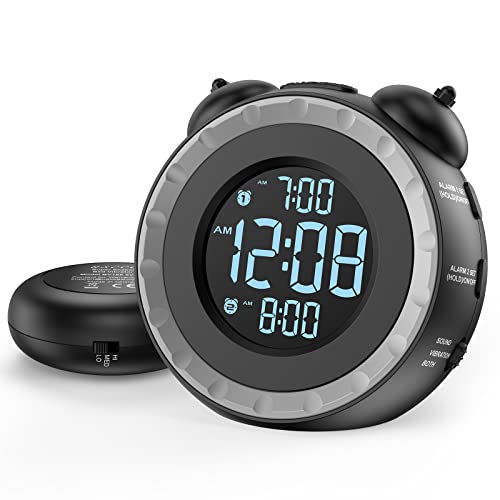 uscce Loud Bedside Alarm Clock with Powerful Bed |
8.1/10 | Buy |
ANALOI Kids Ok to Wake Clock
The ANALOI Kids Alarm Clock is a charming sleep trainer featuring sun and moon visual cues, ten nightlight modes, and seven soothing white noise tracks. It provides an intuitive, light-guided routine for young children learning healthy bedtime habits.
Pros
- Dual sun and moon icons create an easy-to-understand visual routine for toddlers who cannot yet read digital time
- Wide selection of ten lighting modes and three brightness settings allows customizable nursery illumination
- Includes seven calming white noise selections and convenient 15, 30, or 60-minute sleep countdown timers
- Rechargeable battery design eliminates cord clutter and provides flexible placement around the room
Cons
- Nightlight brightness is controlled via three fixed levels rather than a continuous stepless dimming dial
- Specific battery runtime per charge and full recharging times are not detailed in the manufacturer specifications
- Playful dinosaur aesthetic and visual cue system are designed primarily for young children rather than older kids or adults
I-CODE Toddler Ok to Wake Clock
The I-CODE Ok to Wake Alarm Clock is a compact bedside sleep trainer that pairs clear red and green visual cues with friendly facial emojis to teach young children healthy morning boundaries. Equipped with an adjustable night light, flexible nap timer, and toddler-proof lock, it is an effective tool for parents helping kids establish independent sleep routines.
Pros
- Intuitive color-coded lighting and facial expressions help toddlers understand wake boundaries before they can read numbers
- Child safety lock prevents curious toddlers from resetting the clock or changing alarm times
- Versatile nap timer allows parents to set quick rest countdowns without altering regular morning wake schedules
- Small footprint and lightweight 0.65-pound ABS frame fit conveniently on any bedside surface
Cons
- Relies primarily on visual learning cues, which may require an initial adjustment period and parental coaching for younger toddlers
- Compact 4-inch square chassis houses multiple configuration buttons that require careful setup using the included directions
- Manufacturer specifications do not detail internal battery backup or prolonged cordless operating capabilities
Odokee Digital Dual Alarm Clock with 0-100% Dimmer
The Odokee Digital Dual Alarm Clock combines a 0-100% stepless dimmer dial with an adjustable 30dB to 110dB volume range, making it a dependable choice for light-sensitive sleepers and deep sleepers alike. Featuring flexible 7-5-2 dual scheduling, five wake-up tones, and a rear USB charging port, it provides versatile nightstand utility in a compact footprint.
Pros
- Smooth 0-100% rotary dial permits dimming all the way to complete blackout for pitch-black sleep environments.
- Wide 30dB to 110dB volume span with ascending ramp behavior suits both light and deep sleepers.
- Independent dual alarms support 7-day, 5-day weekday, and 2-day weekend scheduling options.
- Emergency 3 AAA battery backup keeps internal memory intact and sounds alarms during AC electrical failures.
- Rear USB charging port reduces nightstand cord clutter by charging mobile devices directly from the clock.
Cons
- AAA battery backup drains cells quickly if used continuously, functioning strictly as a temporary blackout fail-safe.
- Rear USB charging port does not supply power when operating under battery backup mode.
- High-contrast white LED digits may not suit sleepers who prefer red or amber light wavelengths.
uscce Loud Bedside Alarm Clock with Powerful Bed
The uscce Dual Alarm Clock pairs a customizable 3-level vibrating bed shaker with versatile wake-up tones and a 0-100% brightness dial, making it a reliable, compact bedside choice for heavy sleepers, couples, and the hearing-impaired.
Pros
- External 3-level bed shaker provides a strong tactile alternative or supplement to audible alarms
- Stepless 0 to 100% rotary dimmer allows precise brightness control down to complete display shut-off
- Dual rotary ear knobs make adjusting clock and alarm times intuitive right out of the box
- Battery backup sounds the audible alarm and retains internal settings during AC power interruptions
- Integrated USB port charges mobile devices directly from the clock to save wall outlet space
Cons
- Vibrating bed shaker puck and USB charging port do not operate when running solely on AAA backup battery power
- Requires two AAA backup batteries that are not included in the standard retail package
- Lacks dedicated weekday-only or weekend-only programming modes, requiring manual toggling on days off

Step-by-Step Programming and Setup Guide for Bedside Digital Alarm Clocks
Configuring the internal clock on a bedside digital timer requires understanding how the manufacturer engineered its physical control panel. While older mechanical units relied on a simple thumbwheel on the rear housing, modern digital devices utilize microprocessors that govern timekeeping, audio profiles, dimming settings, and wake-up schedules. Following a systematic configuration sequence eliminates guesswork and ensures your device tracks hours accurately from the moment you plug it into the wall.
Identifying Common Control Interfaces and Button Layouts
Digital timepieces generally feature one of three primary input designs to adjust core parameters. Dedicated single-task buttons represent the most intuitive configuration, where each physical switch on the chassis handles a solitary adjustment like hours, minutes, or alarm disarming. Clocks like the Odokee digital alarm clock utilize clearly labeled single-purpose buttons, allowing users to alter digits without holding complex combinations or scrolling through hidden software menus. This layout reduces frustration during groggy late-night adjustments when quick changes are necessary.
Rotary dial controls offer another practical method for setting numbers rapidly. Certain modern devices, such as the uscce dual alarm clock, incorporate dual top-mounted rotary controls that resemble ears to cycle forward and backward through time. Turning an independent dial allows rapid progression through sixty minutes or twelve hours without repeatedly stabbing a tiny tactile dome button. Sleeper households often favor rotary dials because they speed up adjustments during daylight saving transitions or travel between time zones.
Shared multi-function buttons require the most deliberate attention during the initial programming sequence. These interfaces rely on long-press commands to enter programming modes and short taps to increment numerical values. Understanding whether your clock uses dedicated switches, rotary dials, or multi-function keys helps you anticipate the correct physical sequence before attempting to change the display.
Standard Programming Sequence: Hours, Minutes, and AM/PM Calibration
Setting the primary time digits starts with locating the dedicated time button, typically labeled as Time, Time Set, or Clock on the top or rear chassis. On most digital models, holding this button down for two to three seconds causes the hour digits on the LED display to flash rapidly. This flashing visual cue indicates that the internal microcontroller has entered its active programming state and is ready to accept new inputs. If no buttons are pressed within ten seconds, the system usually times out and saves the existing value automatically.
Once the hour digits begin flashing, use the plus and minus keys, or the designated rotary dial, to advance to your current hour. Pay close attention to the small AM or PM indicator light located on the left perimeter of the screen. A frequent mistake involves setting the clock to eight o’clock in the evening while the indicator remains on morning status, which causes audible alarms to trigger twelve hours off schedule. After the hour is correctly set, tap the Time Set button once to transition the flashing cursor over to the minute section.
Adjust the minute digits to match your local standard time and tap the Time Set button a final time to lock in your selection. Many modern units also incorporate a dedicated twelve or twenty-four-hour toggle switch on the base or rear housing. Selecting twenty-four-hour military time completely eliminates the risk of AM and PM confusion, making it particularly useful for medical personnel, first responders, and shift workers on irregular sleeping patterns.
Configuring Dual Alarm Schedules and Wake Modalities
Independent dual alarms allow sleeping partners to maintain separate wake-up schedules on a single nightstand console. Programming an alarm follows a process nearly identical to setting the main clock, but you must initiate the sequence using the specific Alarm 1 or Alarm 2 button. Holding the chosen alarm switch activates the blinking alarm time display, allowing you to establish independent morning wake windows. High-contrast screens ensure you can see which alarm schedule is currently highlighted before saving the parameters.
Advanced bedside models often feature customizable day-grouping options, such as the 7-5-2 calendar mode found on select Odokee clocks. This functionality enables users to assign alarms to every day of the week, weekdays only, or exclusively on weekends. Setting a weekday-only routine prevents jarring buzzers from disrupting restful Saturday and Sunday mornings while eliminating the need to manually disable and re-enable alarms each Friday evening. Always verify that the designated day indicator reflects your upcoming workweek routine.
Wake modality selection represents the final critical step in programming an alarm sequence. Depending on your model, you can choose between ascending electronic beeps, bird chirping, gentle musical melodies, or physical vibration pucks. Heavy sleepers often pair high-decibel buzzers with mechanical bed shakers, such as those supplied with the uscce dual clock, to stimulate physical awakening through tactile mattress vibration. Confirming both the volume setting and the wake modality ensures you awaken reliably without experiencing unnecessary auditory shock.
Programming Children’s Ok-to-Wake Clocks and Visual Timers
Children’s sleep trainers operate on specialized logic designed to teach younger toddlers when it is appropriate to rise from bed. Devices like the ANALOI kids clock and the I·CODE toddler clock pair standard digital timekeeping with intuitive color-changing illumination and expressive facial icons. Parents must set two distinct milestones: a bedtime threshold that turns the glow red with a sleeping face, and a wake-up time that transitions the light to green with an alert smiling face. Understanding these visual cues helps toddlers stay resting in bed until the predetermined morning hour.

Setting the clock on these training units often involves navigating secondary features like countdown nap timers and integrated sound machines. For instance, the ANALOI model provides a three-stage countdown timer alongside seven distinct white noise audio options to soothe children before sleep. When programming these units, parents can establish fifteen, thirty, or sixty-minute white noise timers that gently wind down as the child drifts off. Those seeking tailored illumination options can explore dedicated children sleep trainer clocks to find designs that integrate nightlights alongside daytime color cues.
Child lockout mechanisms represent an essential feature when adjusting time on juvenile bedside electronics. Toddlers frequently tamper with buttons out of curiosity, inadvertently resetting the primary clock or triggering alarms in the middle of the night. Models such as the I·CODE prevent unwanted adjustments by requiring users to hold down the Sleep and Time buttons simultaneously for three seconds to unlock the control panel. Always re-engage the child lock immediately after adjusting the internal clock to preserve your established sleep training routine.
Calibrating Display Brightness and Bedroom Sleep Hygiene
Display luminance plays a direct role in maintaining healthy sleep architecture and nocturnal melatonin production. Excessive blue or cool-white light shining across a bedroom can disrupt circadian rhythms and make falling asleep substantially more difficult. To combat light pollution, modern alarm clocks frequently incorporate full-range rotary dimmers that adjust brightness from one hundred percent daylight clarity down to zero percent absolute blackout. Dial-controlled dimmers allow sensitive sleepers to fine-tune illumination to their exact personal comfort level without being locked into rigid factory presets.
Large white LED digits, such as the 1.6-inch characters found on the Odokee display, provide outstanding legibility from across a dark room for individuals without glasses. However, maintaining oversized digits at full brightness throughout the night can illuminate the entire nightstand area like a nightlight. Reducing the rotary dimmer to a gentle glow preserves nighttime visibility while keeping the surrounding sleep environment dark and relaxing. If you awaken during the night, a dimmed display allows you to check the hours without straining your adjusted eyes.
Zero-percent dimming capability offers the ultimate solution for bedrooms that require pitch-black conditions for deep sleep. By turning the dial completely down, the display shuts off entirely while the internal processor continues tracking time silently in the background. In the morning, tapping the snooze bar or waiting for the programmed wake-up window instantly reactivates the display. Balancing readable digits with darkroom conditions ensures that your timekeeping hardware supports healthy rest rather than impeding it.
Power Supply Architecture and Outage Backup Behavior
Understanding how your digital clock receives and preserves electrical power prevents sudden schedule failures during unexpected grid drops. Most modern bedside units draw their primary energy from a standard alternating current wall outlet using an included DC power adapter. Consolidating your bedside electronics through charging station alarm clocks or units with rear USB charging ports reduces cord clutter while powering phones directly from the clock chassis. However, continuous wall power remains vulnerable to utility interruptions caused by seasonal weather or residential maintenance.
Secondary battery compartments house backup cells, typically requiring two or three AAA alkaline batteries depending on model specifications. A vital distinction exists between full operational battery backup and memory-only time retention circuits. In memory-only architectures, backup cells preserve the internal quartz timekeeping data and programmed alarm parameters during a power cut, but the LED screen and audio drivers remain dark and silent until mains electricity returns. Knowing whether your clock sounds an alarm on battery power alone is essential for setting reliable morning safeguards.
Manufacturers like Odokee and uscce explicitly note that battery power serves primarily as an emergency failsafe rather than a continuous power source. Relying on AAA cells for daily cordless operation rapidly drains battery chemistry because illuminated digital screens consume steady electrical current. To maintain long-term reliability, always leave your bedside unit connected to mains power and inspect backup cells annually to prevent corrosive acid leaks inside the terminal bay. This dual-source power strategy guarantees your clock retains the correct time through any momentary electrical brownout.
Diagnosing Midnight Resets, Time Drift, and Button Lockouts
Waking up to find your bedside display flashing 12:00 AM indicates that the internal memory suffered a complete loss of electrical voltage. This issue frequently arises when a momentary grid flicker interrupts mains power while the backup battery compartment sits empty or contains depleted cells. Checking the battery compartment with a voltmeter or replacing aging cells resolves the majority of midnight reset incidents. Ensuring the barrel plug fits securely into the rear DC input jack also prevents accidental power disconnections when shifting items across the nightstand.
Minor time drift can occur over several months due to ambient temperature variations affecting the internal quartz crystal oscillator. While consumer digital clocks maintain impressive precision, slight variations of one to two minutes per quarter are normal in residential electronics. Periodically auditing your bedside clock against a synchronized cellular network or internet time server allows you to correct minute drift before it impacts morning departures. Performing this simple check twice a year during daylight saving transitions keeps your nightstand display perfectly synchronized.
Unresponsive control buttons typically signal an activated child safety lock or an engaged snooze hold mode. If your clock refuses to alter digits when pressing the setup keys, consult the chassis markings to verify if a dual-button press combination is required to unlock the interface. Furthermore, check that the physical alarm toggle switches on the rear or side panels are not stuck between detents. Clearing physical obstructions around tactile switches restores smooth button actuation and ensures dependable programming access.
Verifying Alarm Functionality Before Sleep
Conducting a quick functional verification immediately after altering your clock time guarantees you will not be surprised by a silent morning failure. Set the alarm one or two minutes ahead of the current reading, allow the clock to advance naturally, and observe the activation sequence. Confirm that the audio output reaches an acceptable volume, that the auxiliary bed shaker vibrates if equipped, and that the top snooze bar temporarily pauses the alert as expected. This brief ninety-second trial provides complete confidence that your hardware is properly programmed for the night ahead.
Once you verify that your alarm sounds and disarms smoothly, return the time settings to your standard wake schedule and adjust the display dimmer to your preferred nighttime level. Taking control of your digital alarm clock programming creates a reliable, stress-free morning routine that supports deeper nocturnal rest. With clear button mapping, accurate AM and PM calibration, and fresh backup batteries installed, your bedside clock stands as a dependable anchor for every upcoming day.
About the author
Dan Caffrey is a Certified Sleep Science Coach and Certified Stress Management Coach with editorial experience covering sleep health and sleep products. He combines consumer-focused research with sleep science to explain product benefits, limitations, and suitability in clear, approachable language.