
How to Set Alarm on 4 Button Digital Watch: Practical Guide for 2026
Learn how to set alarm on 4 button digital watch step by step in November 2026. Master mode cycling, digit adjustments, and silent wake features easily.
 By Dan Caffrey
Updated November 22, 2026

Relying on a smartphone for morning wake-up alerts often introduces unwanted screen glare, disruptive overnight notifications, and the constant temptation to scroll late into the evening. Many sleepers switch to dedicated wrist timepieces, bedside clip clocks, or reliable bedroom alarm clocks to build a distraction-free sleep environment. Understanding exactly how to set alarm on 4 button digital watch hardware eliminates the frustration of confusing button combinations, missed morning routines, and accidental silence when you need a dependable reminder.
Most four-button timepieces share a standardized interface architecture consisting of Mode, Set or Adjust, Start, and Reset buttons positioned around the watch case. Whether you are using a silent wrist device with vibration alerts, an outdoor clip timepiece, or a colorful daily sport model, mastering the programming sequence takes only a couple of minutes. Once you understand how these buttons cycle through operational registers and advance time values, programming daily alarms, countdown intervals, and hourly chimes becomes an intuitive habit.
| Award | Product | ACR Score About ACR ScoreThe ACR Score is our own rating from 0 to 10, based on performance, design and build, ease of use, and value. It reflects independent research and is never influenced by manufacturers, retailers, or affiliate commissions. Learn more › | |
|---|---|---|---|
| Best Premium |
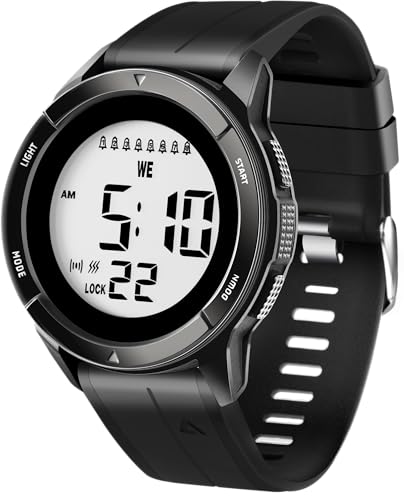 TICCI Vibrating Alarm Watch with 8 Daily Alarms |
8.6/10 | Buy |
| Best Overall |
 NEWITIN Kids Digital Alarm Watch and Bracelet Set |
8.8/10 | Buy |
 DIY 4-Digit Digital LED Alarm Clock Kit |
8.3/10 | Buy | |
| Best Budget |
 Hemobllo 4-Pack Mini Digital Pocket Watch Keychain |
8.6/10 | Buy |
| Best Value |
 NEWITIN Kids Digital Alarm Watch Set with 7-Color |
8.0/10 | Buy |
 Dakota Analog and Digital Clip Watch with Alarm |
8.6/10 | Buy |
TICCI Vibrating Alarm Watch with 8 Daily Alarms
The TICCI Vibrating Alarm Watch delivers direct-to-wrist silent wake-ups and routine reminders with eight independent daily alarms and three alert modes. It is a practical, phone-free solution for heavy sleepers, couples on different schedules, and seniors seeking clear digits and standalone reliability.
Pros
- Direct wrist vibration provides a discreet, silent wake-up option that avoids disturbing others in the room.
- Supports up to eight independent daily alarms for wake-up schedules, recurring reminders, and medication tracking.
- Completely standalone design operates without smartphone apps, Bluetooth syncing, or internet connectivity.
- Lockout feature prevents accidental button activation while tossing and turning in bed.
- Large digital digits and on-demand backlight make nighttime time checks straightforward.
Cons
- 3ATM water resistance protects against splashes and rain but is not suitable for showers, swimming, or hot water immersion.
- Wearable watch design rather than a traditional tabletop nightstand clock, requiring the user to wear it while sleeping.
- Alarm audio volume does not provide listed decibel ratings or multi-level tone customizations.
NEWITIN Kids Digital Alarm Watch and Bracelet Set
The NEWITIN Digital Watch and Bracelet Set provides young kids with an easy-to-read wearable alarm timepiece featuring a 7-color LED backlight, daily alarm, and calendar functions. It offers parents an affordable, phone-free tool to help children learn independent morning routines and daily time management.
Pros
- Built-in daily alarm helps young children practice independent morning wake-up routines without needing a phone or tablet.
- Fun 7-color push-button LED backlight allows clear readability under bedroom blankets or in pitch-black rooms.
- Lightweight 0.13-pound construction with a soft silicone strap keeps wear comfortable on small wrists throughout the day.
- Comprehensive display shows day, date, and calendar information alongside 12-hour or 24-hour time formats.
- Includes three decorative beaded bracelets alongside the watch, making it an engaging gift for young kids.
Cons
- As a wearable timepiece, it does not feature an oversized bedside nightstand display or AC wall power.
- Water resistance requires caution, as the manufacturer advises against pouring water directly onto the dial.
- Lacks specialized heavy-sleeper features such as external bed shakers or adjustable decibel settings.
DIY 4-Digit Digital LED Alarm Clock Kit
This DIY 4-digit digital clock kit offers electronics hobbyists an engaging workbench project to assemble a functional red LED alarm clock powered by an AT89C51 microcontroller. It is an ideal pick for students, makers, and DIY builders who want in-depth soldering experience while creating a compact, customizable desk timepiece.
Pros
- Rewarding DIY assembly project that teaches fundamental soldering and microcontroller circuitry
- Built on a durable military-grade FR-4 PCB board for dependable circuit stability
- High-contrast 4-digit red display with toggleable seconds, minutes, and week views
- Versatile 3V to 5V DC low-voltage power compatibility
Cons
- Requires in-depth soldering and electronic assembly tools, making it unsuitable for buyers wanting an out-of-the-box plug-and-play clock
- Does not include an AC wall adapter, power supply cable, or dedicated protective enclosure
- Lacks advanced modern bedside features such as multi-level auto-dimming or snooze interval adjustment
Hemobllo 4-Pack Mini Digital Pocket Watch Keychain
The Hemobllo Mini Digital Pocket Watch Keychain Set provides ultra-compact portable timekeeping with a clear LED screen in a lightweight clip-on design. It is a practical, pocket-sized solution for travelers, students, and commuters seeking quick time checks without reaching for a smartphone.
Pros
- Exceptionally compact and lightweight plastic construction adds virtually zero bulk to pockets or packs
- Clip-on design allows easy attachment to belt loops, bags, or keyrings for quick time checks on the go
- Four-piece bundle offers strong practical utility for families, students, or multi-bag organization
- Clear LED screen provides straightforward time readouts without requiring a paired smartphone
Cons
- Lacks advanced bedside clock features like dual alarms, snooze bars, or stepless rotary dimming controls
- Small 2.55-inch keychain form factor is not designed for across-the-room visibility from a bed
- Basic plastic casing lacks heavy-duty drop reinforcement or documented water-resistance ratings
NEWITIN Kids Digital Alarm Watch Set with 7-Color
The NEWITIN Digital Alarm Watch Set pairs an easy-to-read digital display and built-in daily alarm with seven vibrant LED backlight colors to help young kids build morning and school routines. Combining durable silicone construction with an engaging design, it offers a practical wearable timepiece for parents seeking screen-free habit building.
Pros
- Built-in daily alarm and hourly chime encourage kids to develop independent morning and homework schedules
- Push-button 7-color LED backlight offers clear dark-room visibility without projecting continuous sleep-disrupting glow
- Comfortable silicone strap is flexible, lightweight, and gentle on small wrists throughout the day
- Includes multiple practical timekeeping features such as a stopwatch, calendar, and 12/24-hour formatting
Cons
- Water resistance is limited for daily wear, and the manufacturer cautions against pouring water directly on the dial
- Backlight requires manual button activation and does not offer continuous ambient nighttime illumination
- Compact side buttons and multi-step programming can be challenging for younger children to configure without adult help
Dakota Analog and Digital Clip Watch with Alarm
The Dakota Analog & Digital Clip Watch combines a rugged water-resistant metal housing with a dual display, Moonglow night illumination, and a built-in alarm chime. It is an excellent pocket-sized companion for travelers, campers, shift workers, and digital detoxers who need reliable, phone-free wake-up utility.
Pros
- Dual analog and digital readouts make tracking two time zones straightforward during travel
- Moonglow electro-luminescent dial lights up evenly without harsh glare in dark sleeping environments
- Sturdy carabiner clip provides hands-free portability and flexible placement options
- Independent battery-driven design provides continuous timekeeping free from wall outlets and power outages
Cons
- Lacks a dedicated flat base or folding kickstand for upright bedside nightstand viewing
- Compact chime volume is suited for close personal waking rather than deep sleepers needing extreme decibel sirens
- Electro-luminescent backlight requires a manual button push rather than staying illuminated continuously

Comprehensive Guide to Setting Alarms on Four-Button Digital Watches
Programming a multi-button digital timepiece does not require memorizing complex electronic manuals or guessing which pusher controls the buzzer. Once you understand the standard logic that watchmakers use to navigate internal menus, setting an alert becomes straightforward across almost any four-button case. Digital modules rely on state registers where each button press shifts the microcontroller into a specific mode, such as standard timekeeping, stopwatch timing, or alarm editing. Learning this workflow allows you to schedule wake-up calls, medication alerts, and daily reminders reliably without second-guessing your settings.
Decoding the Standard Four-Button Layout and Terminology
Most four-button digital timepieces position two pushers on the left flank and two on the right flank of the case. In the vast majority of digital modules, the upper-left button functions as either the backlight trigger or a dedicated Adjust button. The lower-left button almost universally serves as the Mode button, which cycles the display through time, alarm, stopwatch, and calendar functions. Meanwhile, the upper-right button usually acts as Start, Stop, or a numeric increment tool, while the lower-right button functions as Reset, Lap, or a field selector.
Some models alter this configuration slightly depending on whether the case includes dedicated illumination hardware. For instance, sport watches often assign the upper-left pusher exclusively to an electro-luminescent panel or colorful LED backlighting. When the upper-left button operates purely as a light, the lower-left button handles mode navigation, while the right-side buttons manage value adjustments and register selection. Knowing the physical designation of each pusher on your specific casing prevents you from accidentally toggling the wrong feature during late-night adjustments.
Step-by-Step Programming Sequence for Daily Alarms
Initiating the alarm setup sequence begins by pressing the lower-left Mode button from the primary timekeeping screen. Press the Mode button repeatedly until the screen displays the alarm screen, which is typically indicated by the letters AL or a dedicated bell icon. On standard four-button modules, this usually requires one, two, or three sequential presses depending on how many auxiliary modes the watch features. Once you arrive at the alarm display, the current programmed wake-up time will appear stationary on the liquid crystal screen.
Entering the active editing state requires holding down the Adjust button, or pressing a secondary programming pusher if your watch lacks a hold-to-set function. On watches where the top-left button is reserved for lighting, holding the lower-left or lower-right button for two to three seconds often causes the hour digits to flash. Once the digits begin flashing, press the upper-right button to advance the hour forward until your desired wake-up time appears. Tap the lower-right button to shift the flashing cursor to the minute digits, and use the upper-right button again to increase the minutes to your target wake-up time.
Locking in your chosen wake-up time requires one final button press to exit the programming state. Press the Adjust button, or tap the Mode button once, so the flashing digits turn solid and the internal microprocessor records the new schedule. If your watch has an automatic exit timeout, leaving the timepiece untouched for approximately thirty seconds will also return the module to standard standby mode. Always take a moment to look at the screen to ensure the digits stopped flashing before setting the watch onto your nightstand.
Managing AM/PM Indicators and 24-Hour Time Registers
The most frequent reason a digital alarm fails to sound in the morning is an overlooked twelve-hour notation mistake. When programming your alarm time, observe whether an A, P, or PM indicator appears beside the digits on the display panel. If you intend to wake up at six in the morning but accidentally program six in the evening, the watch will remain silent at dawn and chime during dinner. Cycling through the hours using the upper-right increment button allows you to see the indicator shift between morning and evening designations.
Many users eliminate AM and PM confusion entirely by toggling the watch into military or twenty-four-hour time notation. In twenty-four-hour mode, six in the morning displays clearly as 06:00, while six in the evening displays unambiguously as 18:00. This formatting makes accidental scheduling errors virtually impossible because every hour of the full calendar day receives a distinct numeric value. You can generally switch between twelve-hour and twenty-four-hour formats by tapping the upper-right button while in the primary time display mode.
Arming, Disarming, and Managing Hourly Chime Symbols
Setting the alarm time does not always mean the alarm is actively armed to sound or vibrate. Most digital modules require you to toggle the alarm status on or off using a dedicated pusher while viewing the alarm screen. On standard four-button interfaces, tapping the upper-right button while in alarm mode turns the alert on and off. When the alarm is armed, a small bell symbol or the word ALM will appear in a designated corner of the digital panel.
Many four-button watches also include an hourly chime feature, often represented by a bell icon, a radar symbol, or the abbreviation CHI or SIG. If you press the toggle button repeatedly in the alarm screen, the display will usually cycle through four operational states: alarm only, hourly chime only, both active, or both disabled. An unwanted hourly chime can disrupt your sleep by beeping every sixty minutes throughout the night, so make sure only the primary alarm bell symbol remains visible. Disarming the alert entirely follows the same pattern, cycling the pushers until all alert icons disappear from the screen.
Programming Advanced Multi-Alarm and Vibration Modes

Specialized digital watches provide expanded scheduling tools that go far beyond a single daily acoustic beep. The TICCI Men Unisex 8 Vibrating Alarms Watch illustrates how advanced multi-button designs handle complex reminder routines without requiring wireless smartphone synchronization. This watch allows users to set up to eight independent daily alarms, which makes it suitable for complex medication schedules, recurring hydration prompts, and structured shift-work routines. Users can choose between three distinct alert modalities, including sound and vibration, sound only, or vibration only.
Operating a multi-alarm watch involves pressing the Mode button to reach the alarm menu, then tapping the advance button to scroll through individual alarm slots from one to eight. Each alarm slot can be customized independently by holding the set button until the hours flash, adjusting the time values, and selecting the preferred alert modality. The vibration-only mode delivers a discreet sensory wake-up directly to the wrist, which is particularly beneficial for deep sleepers sharing a bed. Pairing silent tactile wrist alarms with dedicated wake-up solutions for heavy sleepers helps individuals wake on time without waking other members of the household.
Dual-Display and Outdoor Clip-On Watch Adjustments
Not all four-button digital timepieces are designed as traditional wristwatches worn on a strap. Outdoor utility pieces like the Dakota Analog & Digital Clip Pocket Watch integrate four digital control pushers around a rugged carabiner case with a combined analog-and-digital dial. These dual-display instruments allow travelers and outdoor enthusiasts to track dual time zones while maintaining independent alarm, stopwatch, and countdown timer capabilities. The digital module on a clip watch operates according to standard four-button rules, while setting the analog hands requires using a separate physical crown.
Clip watches are frequently attached to backpacks, belt loops, or bedside organizers for convenient access during travel and outdoor excursions. The Dakota clip watch incorporates an electro-luminescent dial glow that illuminates both displays with a gentle wash of light that does not overwhelm dark-adapted vision. When setting an alarm on an outdoor clip watch, navigate to the digital alarm screen using the lower-left pusher, hold the set button, and program your wake-up time. Always test the digital chime before heading outdoors to verify that ambient background noise will not drown out the acoustic alert.
Setting Child-Friendly Digital Watches and Backlight Controls
Children often use four-button sport watches as their first introduction to personal time management and morning independence. Timepieces like the NEWITIN 4 Pieces Girls Watch Bracelets Set combine standard digital timekeeping modules with colorful visual accents and child-friendly aesthetics. These watches feature a dedicated upper-left button that controls a multi-color LED backlight, allowing young users to cycle through seven different illumination hues. The remaining three pushers operate the underlying alarm clock, calendar, stopwatch, and hourly chime functions.
Teaching a child how to set their own morning alarm builds essential daily habits and morning self-reliance. To program an alarm on a colorful children sport watch, guide them to press the lower-left Mode button twice until the alarm screen appears. Show them how holding the lower-right button causes the digits to flash, and let them tap the upper-right button to select their morning wake-up time. Integrating a child personal wrist timepiece alongside visual sleep trainers for children provides consistent cues that help young sleepers understand when it is appropriate to start their day.
Troubleshooting Unresponsive Buttons and Common Programming Errors
If your digital watch fails to respond when you press the programming buttons, the most probable cause is an active button lock feature. Timepieces engineered for seniors or outdoor activities often incorporate a lockout mode to prevent accidental button presses from altering saved schedules. On watches with this capability, holding down a specific button combination for several seconds unlocks the internal menu and restores normal pusher responsiveness. Refer to your watch documentation to see if a small key symbol or padlock icon is visible on the digital readout.
Another common programming obstacle occurs when dirt, moisture, or mineral deposits accumulate around the push-button shafts. Over time, pocket debris or sweat can cause the tiny spring-loaded internal contacts to stick, preventing the watch module from detecting your finger presses. Gently wiping the case perimeter with a slightly damp microfiber cloth can loosen external grime and restore smooth mechanical movement. If the screen digits appear faint or fade completely when the backlight activates, the battery voltage has likely dropped below the threshold needed for reliable alarm operation.
Sleep Hygiene and Tactile Wake-Up Strategies for the Nightstand
Many people are choosing four-button digital watches specifically to replace smartphones on their nightstands as part of a healthier evening digital detox routine. Keeping a smartphone beside the mattress exposes sleepers to blue spectrum light, incoming notifications, and midnight temptations to browse social media. In contrast, a simple digital watch provides dependable timekeeping and alarm scheduling without any sleep-disrupting internet connectivity or screen glare. Keeping your watch on a bedside tray beside secondary bedroom timepieces creates an organized, distraction-free environment that promotes deeper rest.
Tactile alerts also represent a significant improvement over jarring acoustic buzzers for light sleepers and households with alternating work shifts. A vibrating watch worn to bed wakes the sleeper through gentle physical pulses against the wrist rather than loud acoustic frequencies that disturb an entire room. This setup prevents morning adrenaline spikes, allowing your cardiovascular system to transition smoothly from deep rest into active wakefulness. If you prefer keeping the watch off your wrist at night, clip timepieces and keychain clocks can rest flat on your nightstand as compact travel alarms.
Long-Term Maintenance, Battery Replacement, and Setting Retention
Standalone electronic watches and DIY assembly modules, such as the B LCD Digital Watch Kit, rely on continuous battery power to preserve their internal registers. Most digital wrist and pocket watches use standard lithium coin cells that provide continuous timekeeping and periodic alarm sounding for extended periods. When replacing a depleted coin cell, the internal microcontroller will typically reset to its factory baseline, erasing all saved alarm times and custom schedules. After inserting a fresh battery, you will need to repeat the four-button setup process to re-establish your preferred wake-up times and calendar data.
Preserving the environmental seal on your watch is equally vital when maintaining long-term alarm reliability. Models with water resistance ratings, such as splash-resistant daily watches, rely on a delicate rubber gasket situated beneath the caseback. When opening the case to replace a battery, ensure the gasket remains properly seated in its groove and free from pinches or tears. Inspecting the seal protects the sensitive quartz circuitry and piezoelectric buzzer from humidity, ensuring your morning alarm continues sounding reliably year after year.
Mastering the four-button programming sequence transforms any basic digital watch into a dependable, personalized wake-up companion. By recognizing how the Mode, Adjust, Start, and Reset buttons interact, you can set accurate wake-up times, avoid AM and PM scheduling pitfalls, and disable disruptive hourly chimes with ease. Whether you rely on silent wrist vibrations, clear acoustic chimes, or an outdoor clip-on display, a properly configured digital watch offers consistent morning punctuality without the clutter and distractions of modern smartphones.
About the author
Dan Caffrey is a Certified Sleep Science Coach and Certified Stress Management Coach with editorial experience covering sleep health and sleep products. He combines consumer-focused research with sleep science to explain product benefits, limitations, and suitability in clear, approachable language.