
How to Fix Projection Clock: Practical Troubleshooting and Setup for 2026
Learn how to fix projection clock issues including blurry numerals, flipped digits, and power resets in October 2026 with practical steps.
 By Jeremy Klein
Updated October 6, 2026
By Jeremy Klein
Updated October 6, 2026
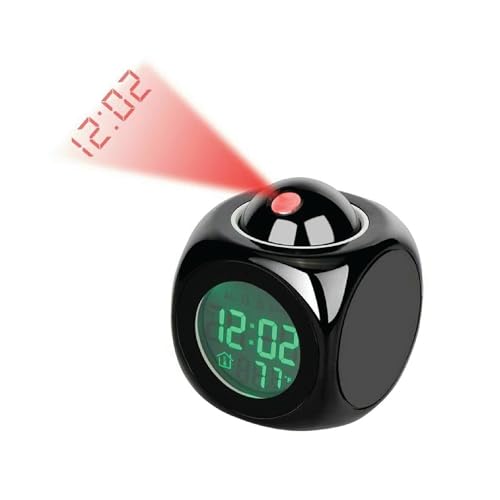
Waking up in the middle of the night only to squint at a ceiling that displays unreadable, distorted red digits or no time at all disrupts an otherwise peaceful sleep routine. A ceiling-projected display is supposed to eliminate the strain of turning over or grabbing a glowing smartphone, but misaligned lenses, inverted digits, and unexpected power cutoffs frequently get in the way. Understanding how to fix projection clock hardware adjustments helps restore crisp timekeeping above your bed without unnecessary frustration. When optical alignment fails or the projection module shuts off unexpectedly, resolving the underlying issue usually takes just a few targeted adjustments to the focus ring, power cable, or orientation toggles.
Many modern bedside units share similar electronic architectures, pairing swiveling optical projectors with internal backup circuits and auxiliary power ports. Whether you rely on dedicated ceiling projectors or versatile top-rated bedside alarm clocks, diagnosing common display glitches keeps your nightstand running smoothly. From correcting upside-down numbers with a single button press to cleaning dirty projection lenses and addressing power adapter disconnects, systematic troubleshooting ensures dependable visibility. Knowing how each setting interacts with your bedroom lighting allows you to optimize numeral brightness without filling the room with intrusive sleep-disrupting glare.
| Award | Product | ACR Score About ACR ScoreThe ACR Score is our own rating from 0 to 10, based on performance, design and build, ease of use, and value. It reflects independent research and is never influenced by manufacturers, retailers, or affiliate commissions. Learn more › | |
|---|---|---|---|
| Best Overall |
The Perfect Part Projection Alarm Clock
|
9.2/10 | Buy |
| Best Value |
 Mesqool 7-Inch Projection Alarm Clock with 180°
|
9.2/10 | Buy |
| Best Premium |
 La Crosse Technology 616-1412 Projection Alarm
|
8.9/10 | Buy |
| Best Budget |
 Netzu Projection Alarm Clock for Bedroom Ceiling
|
8.8/10 | Buy |
 SMARTRO SC91 Projection Alarm Clock with Weather
|
8.8/10 | Buy | |
 GOLOZA Projection Alarm Clock with Curved Red LED
|
7.8/10 | Buy |
The Perfect Part Projection Alarm Clock
The Perfect Part Projection Alarm Clock offers on-demand ceiling projection and ambient temperature tracking in a compact 3.15-inch frame. It is an ideal space-saving choice for bedrooms, dorms, and nightstands needing dependable timekeeping with memory protection.
Pros
- Rotating projector head lets you direct sharp time digits to your preferred ceiling or wall angle.
- 10-second timed projection provides quick nighttime checks without illuminating the entire bedroom all night.
- Dual power configuration ensures time and alarm settings stay saved during power hiccups.
- Small 3.15-inch cube design takes up minimal space on compact nightstands.
- Integrated temperature display offers helpful indoor climate monitoring right at your bedside.
Cons
- Projection does not run continuously, requiring a button press to illuminate for 10 seconds.
- Compact dimensions mean smaller control buttons that may require closer attention to program.
- Battery compartment serves primarily to maintain settings memory rather than continuous cordless projection.
Mesqool 7-Inch Projection Alarm Clock with 180°
The Mesqool Digital Projection Alarm Clock projects clear red numerals onto your ceiling while featuring a 7-inch dimmable LED display, dual alarms, and an integrated USB charging port. It is a dependable, budget-friendly nightstand clock for couples, seniors, and anyone wanting to check the time without turning over in bed.
Pros
- 180-degree adjustable ceiling projection with manual focus ring and image reversal button
- Bold 7-inch red LED screen is easy to read across the bedroom for seniors and low-vision users
- Dual alarms with 5 volume settings and an ascending tone profile to suit both light and heavy sleepers
- Built-in 5V/1.0A USB port allows convenient phone charging directly from the nightstand
- Convenient top buttons include a dedicated DST toggle and a quick 12/24-hour time format switch
Cons
- Battery backup (2x AAA, not included) preserves time memory only and will not illuminate the display or sound alarms during a power outage
- Integrated USB port delivers a standard 1.0A output, resulting in slower charging compared to high-wattage fast chargers
- Brightness adjustment uses 5 preset stepped levels rather than a continuous 0-100% stepless dial
La Crosse Technology 616-1412 Projection Alarm
The La Crosse Technology 616-1412 is a compact bedside projection alarm clock that displays the time on your ceiling alongside indoor climate metrics. It is well suited for sleepers who want quick time checks from bed without craning their necks toward a bright nightstand screen.
Pros
- Sharp 360-degree rotatable projection beam with a dedicated optical focus wheel
- Four-step display dimming includes a true Off option for light-sensitive sleepers
- Built-in indoor temperature and relative humidity sensors assist in bedroom climate awareness
- Compact and lightweight 0.4-pound chassis occupies minimal nightstand space
Cons
- Continuous projection and illuminated display require the AC power cord
- Backup batteries (2 AAA) are not included in the package
- Backlight adjustment relies on fixed step toggles rather than a stepless rotary dial
Netzu Projection Alarm Clock for Bedroom Ceiling
The Netzu Projection Alarm Clock provides clear ceiling projection and bedside timekeeping with integrated room temperature monitoring and adjustable brightness. It is an affordable, practical choice for sleepers who want to check the time overnight without reaching for a smartphone.
Pros
- 180-degree pivoting projector lets you view time and temperature comfortably from pillow height
- Adjustable brightness for both the screen and projection helps protect dark bedroom sleep environments
- Three-step volume selection caters to both lighter and heavier morning sleepers
- Slim, lightweight black housing occupies minimal surface area on bedside tables
Cons
- Requires an active electrical outlet with no documented battery backup to preserve settings during power outages
- Fixed 9-minute snooze interval cannot be adjusted to custom durations
- Does not include secondary extras like USB device charging ports or an FM radio
SMARTRO SC91 Projection Alarm Clock with Weather
The SMARTRO SC91 combines a bedside digital alarm clock with a wireless indoor-outdoor weather station and an adjustable ceiling projector. Featuring dual weekday and weekend scheduling plus customizable snooze intervals, it is a versatile choice for anyone wanting bedroom climate tracking and easy nighttime time checks.
Pros
- Red ceiling projection allows groggy time checks without craning your neck or staring directly at the main screen
- Highly flexible alarm scheduling supports dedicated weekday-only or weekend-only wake times
- Snooze interval is customizable from 5 to 60 minutes rather than locked to a standard fixed duration
- Four-level LCD dimmer includes a complete display-off mode for light-sensitive sleepers
- Wireless outdoor sensor delivers remote temperature and humidity data straight to your nightstand
Cons
- Manual time setup is required as this unit does not support atomic radio clock synchronization
- Additional wireless sensors for channels 2 and 3 must be purchased separately
- Stepped four-level display dimmer lacks continuous 0-to-100 percent stepless dial control
GOLOZA Projection Alarm Clock with Curved Red LED
Featuring a 180-degree rotatable ceiling projector and a curved red LED face, the GOLOZA alarm clock delivers quick time checks without harsh blue glare. With three brightness levels, a progressive 75 dB buzzer, and an onboard USB charging port, it suits light-sensitive sleepers and nightstand minimalists.
Pros
- Red LED light wavelength and separate 3-stage dimming for the face and projector limit sleep-disrupting nighttime glow
- 180-degree articulating projector arm allows convenient ceiling viewing from pillow level across 1.64 to 11.4 feet
- Ascending 75 dB buzzer volume prevents jarring wake-ups while remaining clear for everyday morning routines
- Built-in CR2032 coin battery protects time and alarm settings from resetting during unexpected electrical interruptions
- Rear 5V/1A USB port enables convenient overnight device charging directly from the nightstand
Cons
- Backup battery preserves internal memory only; the display turns off and the alarm will not sound during an AC power outage
- Uses 3 fixed brightness presets rather than a 0-to-100 percent continuous stepless dimming dial
- Peak sound output reaches 75 dB with a single alarm schedule, which may not suit extremely heavy sleepers or dual-routine households
Comprehensive Troubleshooting and Adjustment Guide for Projection Clocks
Diagnosing an unreadable or non-responsive projection clock requires checking optical alignment, power delivery, and digital settings in a methodical sequence. Most projection failures stem from minor mechanical offsets or misunderstandings about how backup batteries interact with mains electrical power. Rather than assuming the internal LED emitter has failed, the following troubleshooting steps provide practical solutions for image blur, inverted digits, shutoff timers, and memory resets.
Resolving Blurry or Distorted Projected Numbers on Ceilings and Walls
Blurry projection digits generally occur when the distance between your clock and the projection surface falls outside the lens system’s calibrated optical range. Bedroom projection clocks, such as models from Mesqool or Netzu, specify an optimum throw distance between 1.6 feet and roughly 10 to 11.4 feet. When the beam travels beyond this range or sits too close to the ceiling, the projected light scatters and causes numeral edges to soften.
Adjusting the manual focus wheel located near the projector head is the primary physical fix for image sharpness. Rotating this dial shifts the internal lens elements relative to the micro-display panel inside the barrel to sharpen projected time and indoor temperature readings. If your clock features a fixed-focus design like the GOLOZA model, moving the clock slightly closer to or farther from the wall naturally brings the digits into focus.
Surface texture and lens cleanliness also influence projected numeral clarity far more than many sleepers realize. Over time, airborne dust settles onto the optical aperture, diffusing the light emitted by the internal diode. Gently wiping the external lens element with a dry microfiber cloth removes smudges, while directing the beam toward a smooth, flat ceiling surface prevents light distortion.
Correcting Inverted, Flipped, or Upside-Down Time Displays
Seeing the projected time displayed upside down or mirrored is one of the most common frustrations after initial nightstand setup. This optical issue happens because swiveling the projector head 180 degrees over the clock chassis inverts the internal display relative to your viewing angle in bed. Manufacturers design these clocks with internal digital flip circuits specifically to resolve this perspective mismatch.
Locating and pressing the dedicated projection flip button instantly reverses the image orientation on your ceiling. On clocks like the Mesqool projection unit, a single press of the projection mode button flips the numbers 180 degrees so they read correctly from bed. Models such as the SMARTRO SC91 include similar toggles that flip both time and temperature readouts simultaneously without needing to reposition the clock housing.
Clocks equipped with continuous 360-degree rotating barrels, such as specific La Crosse Technology designs, combine mechanical rotation with electronic flipping. Rotating the lens barrel aligns the projected beam along the length of your bed rather than diagonally across the room. Aligning the physical angle first ensures that pressing the flip button yields a level, easily readable readout directly above your eyes.
Troubleshooting Projection Beam Failures and Temporary Shutoff Timers
A projector beam that turns off after a few seconds or fails to illuminate entirely is often mistaken for a broken internal LED. In many cases, this behavior is an intentional design feature linked to power delivery rather than a hardware defect. Certain compact bedside units, such as The Perfect Part alarm clock, project time for only ten seconds after pressing the top button to conserve power during battery operation.
Continuous ceiling projection almost universally requires a stable connection to an AC wall adapter. When clocks like the La Crosse Technology 616-1412 or SMARTRO units lose mains power, their internal logic disables continuous projection to protect battery life. If your clock suddenly stops casting continuous light, verify that the power cable is firmly seated in the back panel and connected to a live wall outlet.
Some digital clocks also include a master projection power switch that can be bumped accidentally during nighttime reaching. This switch is typically located on the top or rear chassis and labeled with a small projector icon. Cycling this control confirms whether the optical module was powered down electronically or is experiencing an electrical fault.
Fixing Display Dimming Glitches and Optical Contrast Issues
Projected numbers that appear washed out during daytime or glaringly bright in the middle of the night point to improper dimmer calibration. Optical contrast depends heavily on ambient bedroom lighting conditions and the projector’s lumen output settings. If the projection beam is set to a low brightness tier in a brightly lit room, the numbers will vanish against the ceiling, while full brightness in pitch darkness can disrupt sleep.
Modern projection clocks often feature independent brightness controls for the front-facing screen and the optical projection beam. On the GOLOZA curved alarm clock, for instance, users can separately adjust the face display brightness across three levels while independently managing the projector. Similarly, Netzu clocks allow sleepers to dial down projection intensity to prevent disruptive nighttime glare while keeping the numerals readable.
Choosing the right optical color spectrum also plays a vital role in bedside visibility and circadian comfort. Clocks projecting in narrow-band soft red wavelengths, such as the SMARTRO SC91, minimize melatonin disruption while preserving night vision in pitch darkness. If dimmer adjustments fail to change beam intensity, inspect the power brick to confirm it delivers steady voltage, as low voltage can lock digital dimmer chips.
Diagnosing Constant Clock Resets and Power Backup Disconnects
A projection clock that repeatedly resets to 12:00 AM or loses its alarm schedule after brief power fluctuations suffers from a backup power disconnect. Many owners assume that backup batteries will project time onto the ceiling during a residential blackout. In reality, nearly all digital projection clocks utilize battery compartments strictly for memory retention rather than active illumination, relying on button cells or AAA batteries to preserve internal timekeeping.
When the backup battery dies or develops contact corrosion, even a momentary micro-outage of half a second wipes the clock’s memory. This forces the device into a hard reset, requiring you to reprogram the time, calendar, and projection settings from scratch. To fix recurring resets, open the battery compartment, remove the cells, and inspect the metallic contact springs for powdery residue or mechanical bending.
Replacing expired cells with fresh alkaline batteries ensures that internal time registers remain energized during electrical spikes. When inserting new cells, observe proper polarity markings carefully, as reversed batteries will fail to maintain memory circuits. Once fresh cells are installed, test the backup system by unplugging the AC adapter for ten seconds to confirm that the display returns to the correct hour upon reconnection.
Addressing Projector Arm Swivel Resistance and Angle Limitations
Forcing a stiff or jammed projection arm past its mechanical stop point can sever the delicate internal wiring harness. Most swiveling bedroom projectors rotate across a defined 180-degree arc, moving smoothly from front wall projection to ceiling alignment and back wall positioning. Models such as the Netzu, Mesqool, and GOLOZA units employ internal physical stops to keep the arm from spinning infinitely and damaging internal solder joints.
If the projector arm feels excessively tight or squeaks during adjustment, inspect the hinge seam for manufacturing plastic flash or accumulated dust. Never spray liquid aerosol lubricants like WD-40 into the hinge assembly, as petroleum solvents degrade internal plastics and damage sensitive optical lenses. Instead, gently work the arm back and forth within its intended range of motion to ease stiff friction joints.
When planning projection angles, position the clock so the optical beam hits the ceiling at a nearly perpendicular angle rather than a sharp slant. Projecting at a steep angle creates optical keystoning, where the digits at the top of the display appear significantly larger than the digits at the bottom. Placing the clock on a level nightstand directly beside the bed provides the most symmetrical projection geometry for uniform numeral height.
Managing Ambient Temperature Sensor and Weather Projection Inaccuracies
Advanced projection units that project ambient indoor and outdoor climate data, such as the SMARTRO SC91 or La Crosse Technology models, occasionally display erratic readings. When a projected temperature readout displays dashes or reads several degrees higher than actual room conditions, sensor placement is almost always the cause. Built-in indoor thermistors sit inside the clock’s plastic chassis, meaning placing the unit near a warm lamp or in direct sunlight skews the projected temperature.
Outdoor temperature projection glitches typically stem from wireless radio frequency disconnection between the clock base and its remote sensor. The SMARTRO SC91 communicates with its wireless remote sensor over a 433 MHz band up to a theoretical 200-foot line-of-sight range. Thick concrete walls, metal window frames, and nearby Wi-Fi routers can disrupt this signal, causing the projected outdoor temperature to freeze or disappear until relocated.
Resetting the synchronization between the clock base and the remote sensor clears corrupt data packets and restores real-time temperature projections. Remove the batteries from both the remote outdoor sensor and the clock base, wait sixty seconds for internal capacitors to discharge, and reinsert the batteries in the sensor first. This sequence ensures that the sensor begins transmitting its RF signal before the clock base enters its listening cycle.
Resolving Nightstand Port Overload and Power Supply Instability
Modern projection clocks frequently pull double duty as nightstand charging stations, featuring integrated 5V/1A USB ports for charging phones and tablets. Clocks such as the Mesqool and GOLOZA incorporate these ports to help streamline bedside wiring and free up wall outlets. However, plugging high-draw mobile devices into a low-wattage clock output can overload the internal power board, causing the projection diode to flicker or dim.
Sleepers looking to consolidate bedside cords often compare basic USB clock ports to multi-function bedside alarm clocks with integrated phone charging that feature dedicated high-wattage power supplies. If your projection beam dims noticeably whenever your smartphone begins charging, your clock’s AC wall adapter is struggling to supply adequate amperage. Always use the original factory AC power adapter provided in the manufacturer’s packaging rather than generic, low-amperage third-party USB wall plugs.
In addition to checking adapter output, route the power cord away from high-powered electrical appliances like electric blankets or motorized adjustable bed frames. Electromagnetic interference from high-draw inductive motors can induce ripple currents into unshielded clock power cables, causing intermittent digital display glitches. Keeping bedside wiring organized with velcro ties reduces mechanical strain on the clock’s DC input jack, ensuring steady power delivery to the projection module.
Establishing a Failsafe Routine for Bedside Projection Reliability
Maintaining a dependable bedside projection setup requires periodic checks rather than waiting for a missed wake-up or unreadable display to alert you to a problem. Unlike standard LED clocks or gradual sunrise wake-up light clocks that rely on broad illumination, projection clocks depend on precise optical geometry and continuous AC current. Performing a quick monthly inspection ensures that focus settings, battery backups, and swivel hinges remain in prime working condition.
Begin your routine maintenance by conducting a silent simulated power-outage test during normal daylight hours. Unplug the clock from the wall for fifteen seconds to confirm that the internal memory preserves your programmed alarm times, volume preferences, and 12/24-hour display format. If the clock resets upon reconnection, replace the internal backup coin cell or AAA batteries immediately, then wipe the optical lens with a clean microfiber cloth.
Finally, verify that the projection beam remains aligned squarely with your natural line of sight when resting your head on your sleeping pillow. Fine-tune the focus ring until the minute numerals show crisp, sharp edges without chromatic aberration or blurring. By addressing optical focus, mechanical orientation, and backup power architecture methodically, your projection clock will provide clear, stress-free timekeeping right where you need it most.
About the author
Jeremy Klein is an experienced sleep-product tester with a strong focus on testing methodology, data collection, and real-world product performance. His expertise includes evaluating sleep essentials and wake-up devices through structured testing and practical consumer-focused criteria.