
How to Turn off Alarm on Tzumi Alarm Clock: Practical Step-by-Step Guide for 2026
Learn how to turn off alarm on tzumi alarm clock easily with simple button steps, snooze controls, and troubleshooting tips for November 2026.
 By Daniel Noyed
Updated October 28, 2026

Few morning experiences feel more frustrating than fumbling with tiny plastic buttons while a piercing buzzer echoes across the bedroom. When an unfamiliar display keeps beeping despite repeated button presses, understanding how to turn off alarm on tzumi alarm clock becomes an urgent morning priority. Many modern bedside electronics combine multiple functions onto shared buttons, which makes a routine task like disarming a wake-up chime unnecessarily confusing. Learning the exact button sequence prevents morning stress and keeps you from accidentally resetting your clock time or waking a sleeping partner.
Most multi-function digital clocks separate the temporary snooze duration from the permanent daily deactivation toggle, but their labeled icons can be difficult to decipher in the dark. Exploring reliable bedside alarm clocks reveals how much intuitive physical controls improve the daily morning routine. Whether you are dealing with a recurring dual-schedule alert or a single wake-up reminder, knowing how the internal controls operate ensures that your nightstand remains peaceful once your morning officially starts.
| Award | Product | ACR Score About ACR ScoreThe ACR Score is our own rating from 0 to 10, based on performance, design and build, ease of use, and value. It reflects independent research and is never influenced by manufacturers, retailers, or affiliate commissions. Learn more › | |
|---|---|---|---|
| Best Overall |
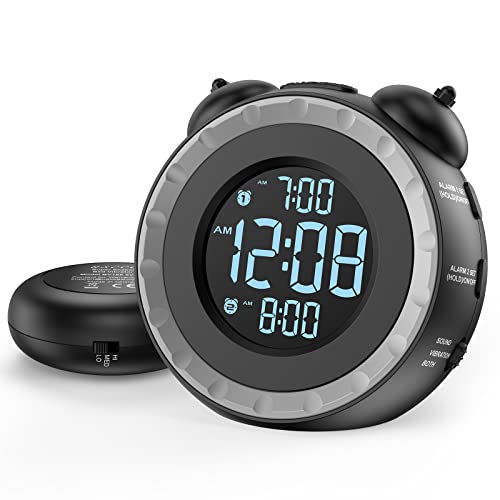 uscce Loud Bedside Alarm Clock with Powerful Bed |
8.1/10 | Buy |
uscce Loud Bedside Alarm Clock with Powerful Bed
The uscce Dual Alarm Clock pairs a customizable 3-level vibrating bed shaker with versatile wake-up tones and a 0-100% brightness dial, making it a reliable, compact bedside choice for heavy sleepers, couples, and the hearing-impaired.
Pros
- External 3-level bed shaker provides a strong tactile alternative or supplement to audible alarms
- Stepless 0 to 100% rotary dimmer allows precise brightness control down to complete display shut-off
- Dual rotary ear knobs make adjusting clock and alarm times intuitive right out of the box
- Battery backup sounds the audible alarm and retains internal settings during AC power interruptions
- Integrated USB port charges mobile devices directly from the clock to save wall outlet space
Cons
- Vibrating bed shaker puck and USB charging port do not operate when running solely on AAA backup battery power
- Requires two AAA backup batteries that are not included in the standard retail package
- Lacks dedicated weekday-only or weekend-only programming modes, requiring manual toggling on days off

Practical Guide to Silencing and Managing Digital Bedside Alarms
Turning off a morning alarm should be an effortless physical action, yet modern digital bedside clocks often complicate the process with shared multi-function controls. When you want to silence your device for the day, hitting the wrong surface often delays the alert rather than canceling it. Disarming an alert requires understanding how your clock distinguishes between a brief pause and a full twenty-four-hour shutoff. Taking a few moments to understand your clock’s interface layout will eliminate early morning confusion and keep your wake-up routine predictable.
Understanding the Difference Between Snooze and Full Alarm Deactivation
The primary reason sleepers struggle to shut down their morning chime stems from confusing the snooze bar with the alarm cancellation toggle. The snooze button is deliberately designed as a large, easily accessible target located along the top of the clock housing. Striking this button immediately silences the acoustic buzzer, but it only suspends the alert for a preset duration, typically around nine minutes. Once that temporary delay expires, the internal speaker or chime resumes at full volume to prevent you from oversleeping.
A complete alarm shutoff tells the internal microchip to suppress the audio until the exact scheduled time on the following day. This action usually requires interacting with a specific function button rather than tapping the broad top platform. Many digital clocks display an active visual prompt, such as a flashing bell icon, whenever the snooze cycle is counting down. You can only consider the wake-up cycle finished when the screen returns to a steady, solid time readout without flashing alerts.
Step-by-Step Instructions for Disarming a Tzumi Alarm Clock
To silence an active chime on a Tzumi digital clock for the rest of the day, locate the dedicated Alarm button on the top or rear control bank. Instead of tapping the wide snooze surface, press the Alarm 1 or Alarm 2 button once while the chime is sounding. On most models, this single targeted press immediately ends the current audio output while leaving your programmed wake-up time stored for tomorrow morning. The clock confirms this action by switching the blinking screen icon back to a steady illuminated symbol.
If you wish to deactivate the alarm entirely so that it does not sound the following morning, you must access the programming mode. Press and release the specific Alarm button when no audio is playing until the corresponding bell or alarm indicator vanishes from the digital screen. Some compact units utilize a shared Power or Mode button to handle daily disarming duties instead of an isolated alarm key. A quick, decisive press is almost always the standard command to silence active alerts without resetting your clock time.
Managing Dual Alarm Schedules and Status Indicator Icons
Bedside clocks equipped with dual alarm capabilities allow two independent wake-up schedules, which is ideal for couples or individuals with varying weekday routines. Each schedule operates on its own dedicated channel, typically labeled as Alarm 1 and Alarm 2 on both the physical housing and the digital screen. Silencing one channel during the morning will not affect the second channel if it is configured for a later hour. You must verify which channel is actively ringing so that you do not inadvertently adjust the wrong schedule.
The status indicators on your front display provide immediate feedback regarding which schedules are armed. When an alarm is active, a distinct numeric digit or bell icon illuminates on the corner of the display face. Deactivating both channels ahead of a rest day requires clearing both icons from the screen panel by pressing each alarm button sequentially. Confirming that both visual indicators have cleared ensures complete bedroom silence throughout the weekend.
Troubleshooting an Alarm That Continues to Sound or Chime
When an electronic bedside clock refuses to silence despite repeated button presses, the underlying problem is frequently a stuck tactile contact or an unresolved snooze loop. If the top snooze mechanism experiences physical resistance from dust buildup or slight chassis misalignment, it may register continuous input. This constant contact prevents secondary control buttons from registering your cancellation commands. Gently tapping the edges of the snooze platform can release a stuck microswitch and restore normal button responsiveness.
If electronic lockups persist, performing a cold hardware restart provides a reliable corrective measure. Disconnect the primary AC power cord from the electrical outlet and remove any installed backup batteries from the lower compartment. Leave the clock unpowered for approximately sixty seconds so that internal capacitors fully discharge and clear residual volatile memory. Reconnecting the power cord resets the internal microprocessor, allowing you to reconfigure your wake-up preferences cleanly.
How Multi-Function Controls Impact Morning Usability

Modern nightstand electronics frequently combine several bedside gadgets into a single chassis to reduce tabletop clutter. Many sleepers select multi-function wireless charging alarm clocks to power mobile devices while maintaining bedside timekeeping. While integrating inductive phone chargers and audio speakers saves substantial space, it often forces engineers to assign several tasks to a minimal number of physical buttons. A single button might handle volume, track skipping, and alarm cancellation depending on how long it is pressed.
This dense control consolidation creates substantial friction when you are groggy and attempting to silence a ringing alarm. Attempting to remember whether a short tap or a long hold silences the speaker is difficult in pitch darkness. Looking for models that maintain clear physical boundaries between daily operational keys and secondary setup buttons prevents accidental setting changes. Clear tactile boundaries keep your morning wake-up process straightforward and stress-free.
Physical Control Ergonomics and Streamlined Rotary Dial Interfaces
Clocks that replace multi-layered button menus with physical rotary dials provide a remarkably superior user experience. The uscce Loud Dual Alarm Clock with Powerful demonstrates how dedicated physical controls eliminate early morning confusion. Rather than forcing you to memorize complex multi-second button presses, this clock features intuitive rotary ears on top of the housing to adjust time and alarm settings directly. Turning an analog-style dial offers immediate tactile feedback that digital touch panels or miniature membrane buttons cannot match.
A key engineering advantage of this intuitive layout is that almost no two functions share the same physical button. With clearly labeled controls distributed logically across the chassis, turning off an alert or modifying your morning schedule takes only a second. The dedicated snooze bar remains prominent and distinct from the deactivation toggles, completely eliminating accidental shutoffs while half-asleep. Raised switches and independent rotary dials can be identified entirely by touch without turning on bedside lamps.
Acoustic Volume Profiling and Sound Selection for Peaceful Mornings
The type of sound an alarm produces directly influences how abruptly you transition from deep slumber to waking alertness. Piercing high-frequency buzzers can trigger sudden adrenaline surges, leaving you feeling agitated right out of bed. For sleepers who prefer a calmer transition, exploring clocks with nature and bird sounds offers an acoustic profile that encourages a more natural waking rhythm. Gentle chirping, melodic tones, or soft chimes help ease sleep inertia without inducing morning anxiety.
Conversely, heavy sleepers and individuals with hearing limitations often require substantial acoustic energy or alternative physical stimulation to awaken reliably. Devices like the uscce Loud Dual Alarm Clock provide multiple wake-up modalities, offering selectable audio options like buzzer, bird song, or music alongside an external bed-shaker puck. This wired vibrating puck slips directly under your pillow or mattress, delivering three adjustable levels of tactile vibration. Combining physical motion with acoustic tones ensures that even the deepest sleepers wake up on time without relying solely on blaring noise.
Power Architectures, Outages, and Battery Backup Reliability
A bedside clock must maintain dependable timekeeping even during unexpected residential electrical interruptions. Most modern digital timepieces run primarily on standard AC household current via a wall adapter, with an internal battery compartment serving as a contingency plan. However, the exact functionality provided by backup batteries varies significantly between different clock designs. Understanding whether your device provides active operational backup or memory-only retention determines whether you can trust it during a blackout.
In memory-only designs, backup cells simply keep the quartz oscillator running so the clock does not reset to 12:00 AM when power drops. On these clocks, the display turns dark and the speaker will not sound if an outage occurs at your wake-up time. In contrast, advanced dual-power units like the uscce Loud Dual Alarm Clock use two AAA backup batteries to actively support acoustic alarms during an outage. While high-drain features like the bed-shaker motor and rear USB charging port pause to conserve cell life, the audible alarm continues to protect your schedule.
Display Dimming, Nightstand Light Pollution, and Restful Bedrooms
Bright electronic screens on bedside tables represent a leading cause of disrupted sleep hygiene and nighttime restlessness. Standard digital alarm clocks often emit harsh blue or white backlighting that suppresses natural melatonin synthesis in the brain. Even low levels of ambient nightstand glare can penetrate closed eyelids, preventing the deep restorative sleep cycles needed for physical recovery. An effective bedside clock must provide comprehensive control over its illumination levels.
Clocks limited to fixed high, medium, and low brightness steps frequently remain uncomfortably bright in pitch-black bedrooms. A continuous dial dimmer that smoothly transitions from full illumination down to zero percent blackout provides far greater sleep comfort. With dial-controlled zero to one hundred percent dimming, sleepers can adjust illumination to the exact threshold that allows legibility without illuminating the room. Highly sensitive sleepers can even blackout the display entirely throughout the night while leaving the acoustic alarm active.
Practical Verification and Preventing Future Wake-Up Errors
Establishing a dependable routine for testing your bedside alarm settings prevents costly oversleeping mishaps. Whenever you adjust your schedule or clear a recurring chime, perform a quick verification by checking the active screen indicators. Confirm that the AM or PM status icon correctly reflects your intended wake-up window, as confusing morning and evening hours is an exceptionally common programming mistake. A simple glance at the screen before turning off your bedside lamp guarantees that your settings match your morning plans.
If you have recently reconfigured dual schedules or recovered from an electrical outage, running a daytime test alarm provides complete peace of mind. Set the chime two minutes ahead of the current time and observe how the clock behaves when the alert triggers. Practice disarming the chime using the dedicated alarm button rather than tapping snooze so that the physical motion becomes second nature. This brief practice session builds tactile familiarity and ensures you can silence your device smoothly and effortlessly tomorrow morning.
About the author
Daniel Noyed is a Certified Sleep Science Coach and experienced product editor with extensive knowledge of sleep health and sleep-related products. He has hands-on experience testing hundreds of products and translating technical features into practical guidance for everyday sleepers.