
How to Record an Alarm Sound: Practical Guide for 2026
Learn how to record an alarm sound techniques using built-in microphones, USB transfers, or memory cards with our bedside audio setup guide for October 2026.
 By McKenzie Dillon
Updated October 6, 2026
By McKenzie Dillon
Updated October 6, 2026
Waking up to a piercing, high-pitched electronic buzzer often triggers an abrupt adrenaline spike that leaves sleepers feeling disoriented. Many people seek a gentler, more personalized morning routine by learning how to record an alarm sound using custom voice notes, soothing music clips, or familiar phrases. Upgrading your nightstand with versatile top-rated alarm clocks for bedrooms provides total control over auditory wake-up cues without the late-night notifications of a smartphone.
Whether you want to program an encouraging greeting for a student, set up gentle reminders on children’s ok-to-wake clocks, or craft an impossible-to-ignore wake-up tone, modern bedside hardware makes audio personalization straightforward. Different hardware solutions approach custom audio through integrated microphones, direct USB data transfer, or external memory card playback. Understanding these distinct recording architectures ensures your wake-up audio sounds clear, plays at dependable volume levels, and survives sudden household power interruptions.
| Award | Product | ACR Score About ACR ScoreThe ACR Score is our own rating from 0 to 10, based on performance, design and build, ease of use, and value. It reflects independent research and is never influenced by manufacturers, retailers, or affiliate commissions. Learn more › | |
|---|---|---|---|
| Best Value |
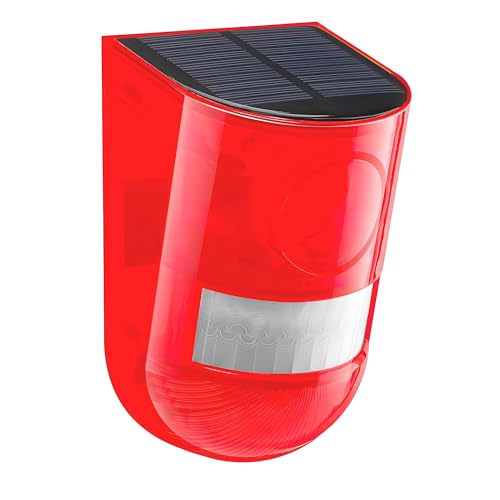
Solar Sound & Light Alarm Motion Sensor 110
|
8.6/10 | Buy |
| Best Budget |
 Yunir Retro Vinyl Turntable Bedside Digital Alarm
|
8.0/10 | Buy |
 Waytronic Motion Sensor Recordable Audio Speaker
|
7.8/10 | Buy | |
 EZSound Light-Activated MultiPlay Sound Chip
|
8.0/10 | Buy | |
| Best Overall |
 Chiyyak Loud Sound Alarm Button with Red Lights
|
9.1/10 | Buy |
| Best Premium |
 Maqulae Target Digital Alarm Clock with Infrared
|
8.1/10 | Buy |
Yunir Retro Vinyl Turntable Bedside Digital Alarm
The Yunir Retro Turntable Clock combines vintage gramophone aesthetics with modern bedside audio, featuring a tap-activated hidden screen and Bluetooth 5.0 playback. It is a charming, portable solution for bedroom minimalists and students seeking a stylish, phone-free wake-up piece.
Pros
- Aesthetic vintage vinyl player look adds distinct personality to bedroom nightstands
- Tap-to-wake hidden display prevents unwanted nighttime light pollution while sleeping
- Cordless rechargeable battery allows flexible placement away from wall outlets
- Versatile audio source options including Bluetooth 5.0, TF card, and auxiliary cable
Cons
- Alarm scheduling requires scanning a QR code program rather than using direct physical clock buttons
- Screen automatically sleeps after 5 minutes, preventing continuous glanceable timekeeping at night
- Lacks a dedicated traditional oversized snooze bar on the top housing
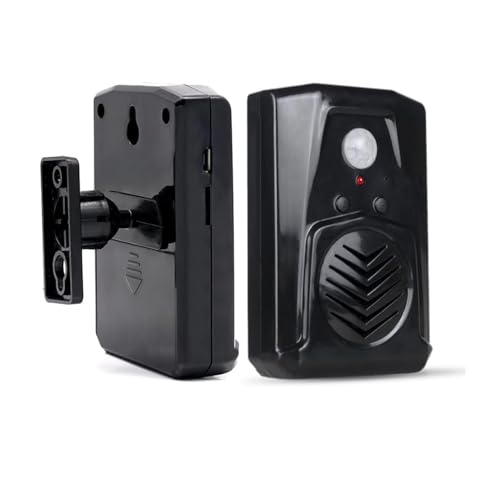
Waytronic Motion Sensor Recordable Audio Speaker
The Waytronic Motion Sensor Recordable Speaker provides personalized voice prompts with up to 130 seconds of recordable audio and two volume levels, triggered by an integrated PIR infrared sensor. It serves as an effective, screen-free audio reminder for seniors, caregivers, and households needing dependable motion-activated morning prompts or doorway alerts.
Pros
- Built-in microphone enables instant recording of personalized audio prompts up to 130 seconds without external computer software.
- Wide 120-degree horizontal and 60-degree vertical sensor coverage ensures consistent motion triggering.
- Two-level volume switch allows easy adjustment between softer bedside reminders and louder room alerts.
- Completely screenless construction produces zero display light pollution or bedroom glow.
- Comes with ball-joint mounting hardware and screws for flexible angle positioning.
Cons
- Lacks an illuminated digital clock display, requiring separate timekeeping devices to check the time.
- Recordings must be longer than 3 seconds to register successfully on the internal memory.
- PIR sensor requires careful indoor placement away from direct sunlight, heaters, or air conditioners to prevent false triggers.
EZSound Light-Activated MultiPlay Sound Chip
The EZSound MultiPlay Light-Activated Sound Chip is a compact, USB-rechargeable MP3 audio module that plays custom recordings whenever exposed to light. It is an inventive choice for DIY enthusiasts looking to add personalized wake-up greetings, reminders, or songs to nightstand boxes and drawers.
Pros
- Rechargeable 200mAh battery eliminates the need for frequent disposable button-cell battery replacements
- Straightforward USB drag-and-drop loading makes updating MP3 audio tracks fast and hassle-free
- Integrated volume adjustment and on/off switch offer direct control over playback loudness
- Compact, lightweight build with peel-and-stick adhesive fits neatly inside nightstand drawers or crafts
Cons
- Lacks an integrated clock display, digital timer, or scheduled alarm trigger, relying entirely on external light exposure to play
- Total internal storage is limited to 2MB and 120 seconds, restricting use to shorter audio clips and voice messages
- Must be stored in a completely dark environment like a closed box or drawer to prevent unintended daytime triggering
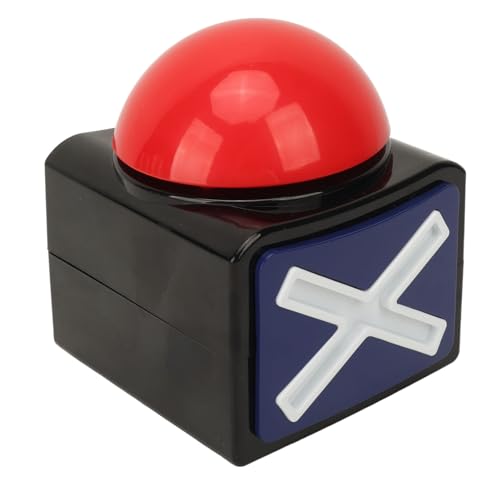
Chiyyak Loud Sound Alarm Button with Red Lights
The Chiyyak Loud Sound Alarm Button is a battery-powered push buzzer featuring sound effects and red illumination in an easy-to-press box design. It provides a tactile, instant alert tool for playful household wake-ups, trivia nights, and classroom activities.
Pros
- Immediate audio and visual response combining sound effects with active red lights.
- Completely cordless operation using two widely available 1.5V AA batteries.
- Generous button surface allows effortless, blind palm-slap activation.
- Durable plastic housing maintains stability on flat surfaces during rapid presses.
Cons
- Lacks an automated timekeeper, digital clock face, or programmable alarm schedule.
- Requires two 1.5V AA batteries that are not included in the package.
- Sound volume and audio tone choices are not adjustable or specified by decibel rating.
Maqulae Target Digital Alarm Clock with Infrared
The Maqulae Target Alarm Clock pairs a large LED digital display with an interactive infrared target game to help heavy sleepers wake up actively. Featuring voice-recording customization and two alarm difficulty settings, it provides an engaging wake-up solution for students, teenagers, and deep sleepers.
Pros
- Interactive infrared target mechanic forces mental focus to stop or snooze alerts
- Voice recording feature allows replacement of standard buzzers with custom audio clips
- Two alarm modes (Normal and Hard) cater to different morning wake-up needs
- Large LED time display is easy to read from across the room at a glance
- Included Timing and Count game modes add fun utility beyond standard timekeeping
Cons
- Manufacturer specifications do not document display dimming controls for pitch-black rooms
- Aiming an infrared emitter while half-awake may feel cumbersome for sleepers wanting a quick shutoff
- Listing details do not specify power source requirements or backup battery fail-safe operation
A Complete Guide to Recording and Setting Custom Alarm Audio
Learning how to record an alarm sound transforms an ordinary nightstand clock into an effective, personalized wake-up system. Standalone bedside electronics rely on three primary recording architectures: on-board microphones, digital file transfers via USB connections, and memory card audio playback. Matching the right recording technique to your specific hardware ensures clear audio reproduction and dependable morning awakening.
Direct Microphone Recording on Bedside Devices
Many specialized bedside clocks and interactive units feature built-in electret microphones designed for quick voice capture. Devices such as the Maqulae Gun Alarm Clock, Alarm Clock for Bedroom allow users to capture short audio phrases directly through an on-board recording button. To begin recording, you typically press and hold the designated record toggle until an audible indicator or flashing LED signals active audio capture. Speaking in a clear, consistent tone directly into the pinhole microphone opening delivers the cleanest input signal.
Proper physical distance plays a critical role during direct microphone recording. Position your mouth between four and six inches from the microphone opening to prevent breath pops and acoustic distortion. If you position the microphone too close, high sound pressure levels will overload the tiny audio preamp, resulting in a muffled or scratchy playback sound. Conversely, speaking from several feet away introduces room reverberation and lowers the overall playback volume on your morning alarm.
Most direct-recording bedside clocks incorporate short audio limits ranging from ten seconds to two minutes. The Infrared Motion Sensor Activated Sound Speaker from Waytronic, for example, provides a dedicated built-in microphone that supports up to 130 seconds of segmentable audio recording. Releasing the record button finalizes the track in internal non-volatile storage, where it immediately becomes the default wake-up or alert tone. Running a quick playback check right after recording verifies that your voice sounds loud enough to wake you from deep sleep.
USB Data Transfer and Audio File Customization
When voice capture through a pinhole microphone lacks sufficient fidelity, USB-enabled audio chips offer professional-grade sound customization. Dedicated sound modules like the EZSound MultiPlay Light Activated Recordable Sound connect directly to desktop computers, laptops, or tablets using a standard USB interface. Once plugged in, the device mounts as a standard flash drive, allowing you to drag and drop pre-recorded MP3 or WAV audio tracks directly into the internal storage folder.
Preparing your audio files on a computer provides precise control over volume gain, audio equalization, and track duration. You can record custom wake-up messages using smartphone voice memo apps or desktop recording software, edit out background noise, and normalize the volume level to maximum clean gain. Digital sound chips often provide two megabytes of internal storage, which easily holds up to 120 seconds of high-fidelity stereo or mono audio across multiple clips.
Transferring files over USB also allows sleepers to wake up to unique audio clips, energetic motivational speeches, or gentle nature melodies. Before disconnecting the sound module from your computer, always safely eject the drive through your operating system to prevent file table corruption. Testing the transferred audio through the device speaker confirms that the audio format and bit rate match the hardware processor requirements.
Memory Card Insertion and External Playback Options
Bedside sound systems with external memory card slots eliminate recording length restrictions entirely. Multi-functional tabletop units such as the Record Player, Record Player with Speakers combine vintage aesthetic styling with modern storage slots and Bluetooth connectivity. By loading audio files onto a MicroSD memory card, users can curate extended wake-up playlists or lengthy voice recordings that play when the scheduled alarm triggers.
Setting up custom audio through memory cards requires formatting the storage card to compatible file systems, typically FAT32. Save your desired wake-up tracks in standard MP3 format within the root folder or a designated alarm folder according to the manufacturer specifications. While some sleepers rely on wireless charging alarm stations for convenience, dedicated playback devices with physical memory cards guarantee uninterrupted wake-up audio without wireless pairing drops.
Memory card setups are particularly advantageous for individuals who require extended morning audio routines rather than short, repeating alarm beeps. You can program a gentle progression that begins with soft natural soundscapes and builds toward motivating voice reminders over several minutes. Clicking the primary multi-function control knob turns off the alarm routine once you are fully awake, ensuring a smooth transition into your morning schedule.
Acoustic Volume Balance and Awakening Reliability
Waking up reliably requires finding the correct balance between clear voice comprehension and sufficient acoustic sound pressure. If a recorded alarm sound is too quiet, deep sleepers will easily sleep through the playback. High-decibel alerting devices, such as the Solar Sound & Light Alarm Motion Sensor 110 from Comboss, utilize sirens capable of reaching 110 decibels to ensure immediate responsiveness across large spaces. For bedroom use, custom wake-up audio typically performs best between 65 and 80 decibels at nightstand distance.
Miniature speakers built into bedside clocks often feature small dynamic cones or metal diaphragms with limited bass response. When mastering custom audio clips on a computer or recording through an external microphone, apply a gentle high-pass filter to remove sub-bass frequencies below 150 Hertz. Cutting unnecessary low-end rumble prevents miniature speakers from rattling or distorting, allowing spoken vocal frequencies between 1,000 and 4,000 Hertz to cut through sleep inertia cleanly.
Heavy sleepers who struggle with auditory grogginess can pair custom recorded voice alarms with secondary sensory wake-up tools. Combining a vocal greeting with gradual ambient light from sunrise clocks for heavy sleepers stimulates natural cortisol awakening responses while your recorded message plays. This multi-sensory awakening strategy prevents oversleeping without requiring jarring, panic-inducing buzzer frequencies.
Power Architecture and Audio Memory Retention
Understanding how your alarm hardware stores audio data is essential for bedroom reliability. Modern digital sound modules and recordable clocks utilize non-volatile flash memory chips that retain stored audio files indefinitely, even when primary electrical power is lost. Whether a battery runs completely flat or a storm disconnects household electricity, your recorded voice track remains intact without requiring re-recording.
However, operational power delivery during an electrical outage depends strictly on internal battery architecture. Units powered exclusively by household wall adapters may keep their internal quartz clock and audio memory active via a small coin cell, but they cannot drive the speaker cone or display screen during a blackout. In contrast, battery-operated units like the Schimer Loud Sound Alarm Button for Game Shows, which runs on standard AA batteries, deliver full acoustic playback anywhere without wall power constraints.
For critical wake-up schedules, check whether your bedside clock features true operational battery backup or memory-only retention. Clocks with active secondary battery circuits can sound your custom recorded message even when the main grid fails. Replacing disposable backup batteries annually or recharging internal lithium cells guarantees that your custom wake-up audio triggers reliably every morning.
Motion and Light Sensor Triggering for Wake-Up Reminders
Beyond conventional scheduled time alarms, light and motion sensors offer innovative ways to trigger custom recorded audio. Sound modules equipped with photo-sensors activate stored messages the moment morning sunlight enters the bedroom or when a bedside cabinet door opens. This automated mechanism is ideal for creating customized wake-up routines that react dynamically to natural dawn light.
Motion-activated recordable speakers offer another dependable method for morning reminders, encouraging sleepers to get out of bed. By positioning a sensor unit across the room near the bathroom door or kitchen entrance, the device plays an uplifting voice reminder as soon as you step onto the floor. Adjustable detection angles ensure that ordinary tossing and turning in bed does not accidentally trigger the sensor during the middle of the night.
Sensor-triggered audio units also excel as assistive reminder tools for family members who need medication alerts upon waking. Recording a clear, supportive voice instruction helps maintain daily habits without the stress of an intrusive digital buzzer. Choosing hardware with two-level volume controls allows you to calibrate the alert level to match daytime activity or quiet nighttime hours.
Preventing Accidental Overwriting and Calibration Testing
Accidental audio erasure represents one of the most frustrating issues when using direct-recording alarm clocks. Because record buttons are often located adjacent to standard time-setting or snooze controls, an errant button press in the dark can inadvertently wipe your custom track. Clocks designed with recessed record switches or multi-step confirmation sequences provide essential protection against accidental audio overwriting.
When configuring a new recording, always perform an immediate functional calibration test before relying on the clock for work or school. Set the alarm time two minutes ahead of current clock time, step back to your normal sleeping position, and listen to the playback quality and volume level. This silent-room rehearsal confirms that the recording starts cleanly at the beginning of the file and loops or silences according to your preferred alarm duration.
Inspecting physical button layout is equally important for smooth daily operation. Ensure that the primary snooze bar has distinct physical separation from the recording toggle so you can silence the alarm groggily without modifying stored audio. If your device includes a physical lock switch on the rear casing, engage it immediately after finalizing your custom audio track.
Strategic Audio Content for Sleep Hygiene and Waking Ease
The specific content of your recorded alarm sound exerts a measurable influence on morning mood and mental alertness. Harsh, abrupt screams or blaring sirens stimulate acute fight-or-flight cardiovascular responses, causing elevated morning stress. Conversely, selecting gentle ascending melodies, motivating affirmations, or calm voice reminders allows the brain to transition smoothly out of deep sleep cycles.
Parents frequently use recordable wake-up clocks to establish structured morning habits for young children. A familiar parent’s voice wishing a child good morning and outlining morning steps promotes independence and reduces morning resistance. For shift workers or heavy sleepers, personal voice tracks detailing critical morning priorities provide an immediate mental anchor that cuts through lingering sleep inertia.
Rotating your recorded audio every few weeks prevents auditory habituation, where the subconscious brain learns to tune out familiar, repeating morning sounds. Updating your wake-up track takes only a few seconds on recordable clocks, keeping your morning awakening fresh and reliable. Selecting dependable bedside hardware empowers you to take full control over your auditory bedroom environment.
Mastering custom alarm recording allows you to replace aggressive factory buzzers with personalized wake-up sounds tailored to your lifestyle. Whether you choose direct microphone recording, drag-and-drop USB modules, or memory card playback, verifying audio clarity and backup power architecture ensures complete morning dependability. Taking a few moments to test your recorded track establishes a peaceful, predictable bedside routine that helps you wake up on time every day.
About the author
McKenzie Dillon is a Certified Sleep Science Coach and experienced sleep-product editor who has personally tested dozens of sleep products. Her expertise bridges sleep technology, product evaluation, and practical guidance for creating more comfortable sleep and wake-up routines.