
How to Set a Radio Alarm Clock: A Step-by-Step Bedside Guide for 2026
Learn how to set a radio alarm clock step by step for October 2026, from tuning AM/FM stations to programming dual wake times without morning static.
 By McKenzie Dillon
Updated October 6, 2026
By McKenzie Dillon
Updated October 6, 2026

Waking up to an abrasive buzzer often triggers an immediate surge of adrenaline that leaves you feeling startled before your feet touch the floor. Replacing harsh morning chimes with music or talk radio offers a calmer transition into the day, which is why many sleepers continue to rely on traditional bedside hardware. Learning how to set a radio alarm clock correctly ensures that your preferred morning broadcast begins playing at the exact minute you intend without sudden blasts of static. Modern units from trusted manufacturers blend digital frequency tuning with reliable wake schedules, making them dependable centerpieces among reliable bedroom digital alarm clocks designed to keep smartphones off the nightstand.
While modern bedside electronics have evolved to include automatic time synchronization and digital phase-locked loop tuners, initial configuration can occasionally feel confusing in low lighting. Understanding how your clock manages station memory presets, twelve-hour morning and evening indicators, and dual-alarm schedules keeps you from missing work or waking a partner accidentally. Taking a few moments to understand the interface gives you full control over morning volume, backup battery maintenance, and display brightness. Once you establish the initial settings, your bedside clock radio delivers a smooth, dependable wake-up routine every single morning.
| Award | Product | ACR Score About ACR ScoreThe ACR Score is our own rating from 0 to 10, based on performance, design and build, ease of use, and value. It reflects independent research and is never influenced by manufacturers, retailers, or affiliate commissions. Learn more › | |
|---|---|---|---|
| Best Overall |
Ken-Tech Digital AM/FM Clock Radio with Loud Alarm
|
9.1/10 | Buy |
| Best Value |
 Emerson SmartSet Dual Alarm Clock Radio
|
8.9/10 | Buy |
| Best Budget |
 Emerson SmartSet Dual Alarm Clock Radio
|
8.4/10 | Buy |
| Best Premium |
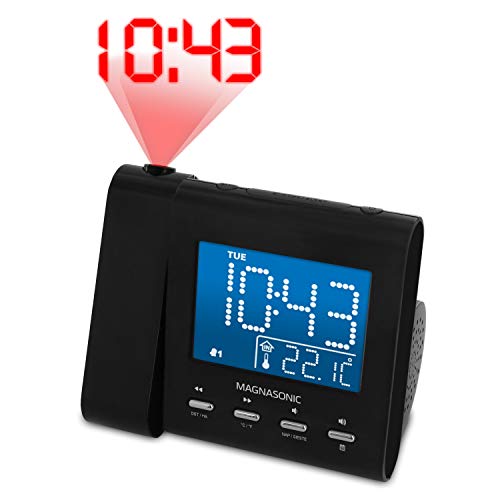 Magnasonic Projection Alarm Clock with AM/FM
|
8.4/10 | Buy |
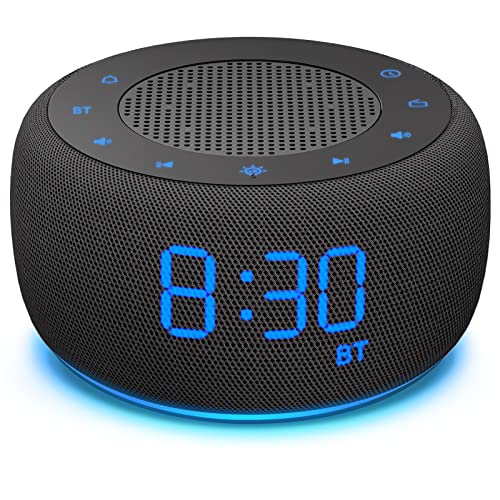 BUFFBEE Bedside Alarm Clock with Bluetooth
|
8.3/10 | Buy | |
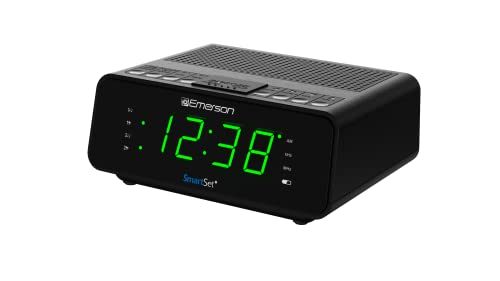 Emerson SmartSet Dual Alarm Clock Radio
|
8.1/10 | Buy |
Ken-Tech Digital AM/FM Clock Radio with Loud Alarm
The Ken-Tech AM/FM Clock Radio delivers a compact bedside timekeeping solution featuring high-contrast red LED digits and a loud wake-up buzzer or radio option. It is an affordable, fuss-free choice for heavy sleepers, students, and anyone looking for a simple nightstand clock without complicated menus.
Pros
- Loud buzzer option provides dependable audio wake-up performance for heavy sleepers.
- Red LED illumination is naturally less jarring on dark-adapted eyes than cool white or blue displays.
- Ultra-compact 4-inch wide profile occupies minimal bedside table real estate.
- Simple, clearly marked controls ensure quick setup without navigating complex digital menus.
- AM/FM radio capability offers a pleasant alternative to abrupt morning buzzers.
Cons
- Specifications do not detail multi-level display dimming or a complete blackout sleep mode.
- Lacks modern conveniences like integrated USB charging ports or dual-alarm scheduling.
- No documented battery backup details in listed specifications to confirm outage fail-safe protection.
Emerson SmartSet Dual Alarm Clock Radio
The Emerson CKS1521 SmartSet is an easy-to-use bedside alarm clock radio featuring automatic time setup, Bluetooth streaming, and a built-in USB charging port. It is an ideal pick for commuters, couples, and students who want dependable weekday and weekend dual alarms paired with a readable orange display.
Pros
- SmartSet system eliminates tedious manual clock setting and automatically updates for Daylight Saving Time
- Three alarm scheduling modes allow separate routines for workdays and weekends without daily reconfiguration
- Warm orange display digits reduce harsh nighttime glare compared to high-contrast white or blue displays
- Convenient bedside connectivity with Bluetooth 5.1 audio streaming, AUX input, and a USB charging port
- Digital FM tuner provides quick access to morning news and talk radio with 20 memory presets
Cons
- Stepped dimmer provides three preset brightness levels and auto-dim rather than a continuous 0-100% rotary dial
- The 5V/1.5A USB charging port provides standard overnight charging rather than high-wattage fast charging
- Clock relies on continuous AC wall power for active display readouts and alarm sounding
Emerson SmartSet Dual Alarm Clock Radio
The Emerson SmartSet CKS1500 is an ultra-compact bedside alarm clock radio featuring automatic time setup, dual alarms, and AM/FM digital tuning with 20 presets. It is an affordable, worry-free choice for sleepers who want simple schedule management without manually resetting the clock after power outages.
Pros
- SmartSet auto-time configuration eliminates tedious initial setup and post-blackout reprogramming
- Dual independent alarms accommodate different morning schedules or couples sharing a nightstand
- Compact dimensions leave plenty of room for bedside lamps, glasses, and phone stands
- Digital PLL radio offers clear station recall with 20 stored presets alongside a sleep timer
Cons
- The 0.9-inch digits are relatively small for users looking to read time across large bedrooms without glasses
- Included button cell acts as memory backup only and does not power the display or buzzer during an active blackout
- Blue LED display wavelength can produce visible ambient glow in pitch-black bedrooms even on lower dimmer steps
Magnasonic Projection Alarm Clock with AM/FM
The Magnasonic EAAC601 is a versatile projection alarm clock radio featuring a 3.6-inch dimmable blue LCD, 180-degree ceiling projection, and dual alarms with weekend cancellation. It is well-suited for couples and commuters who want an easy-to-read time projection without turning toward their nightstand.
Pros
- 180-degree adjustable swivel projector lets you check the time without rolling over toward the nightstand
- SelfSet automated time configuration and automatic Daylight Saving Time adjustments minimize setup hassle
- Dual alarm feature with weekend cancellation caters to couples with differing morning schedules
- Built-in lithium backup ensures alarm and time settings are preserved during household power outages
Cons
- Blue LCD screen wavelength can be noticeable in pitch-black bedrooms even with the dimming feature enabled
- Built-in battery backup preserves internal memory and restores settings rather than offering full cordless alarm operation
- Does not feature integrated USB charging ports for bedside smartphones or personal electronic devices
BUFFBEE Bedside Alarm Clock with Bluetooth
Compact and multifunctional, the BUFFBEE Bedside Alarm Clock combines an FM radio and Bluetooth speaker with a 0-100% dimmable display and progressive wake-up audio. It is an ideal space-saving choice for light-sensitive sleepers seeking gentle mornings and clutter-free nightstands.
Pros
- 0-100% continuous display dimming allows precise control over bedroom light levels.
- Gradual volume ramp prevents harsh acoustic wake-up shock in quiet morning environments.
- Combines a digital clock, FM tuner, and Bluetooth speaker into a single compact unit.
- Soft bottom night light assists safe room navigation in total darkness without turning on overhead lamps.
- Small 4-inch footprint occupies minimal bedside surface area on tight nightstands.
Cons
- Requires constant AC wall outlet power with no standalone cordless battery operation.
- Compact 4-inch profile means digit readouts are smaller than dedicated oversized senior display clocks.
- Bedside audio driver is tuned for close-range personal listening rather than large-room audio reproduction.
Emerson SmartSet Dual Alarm Clock Radio
The Emerson SmartSet CKS1900 is an easy-to-use bedside clock radio featuring automated time setting, dual alarms, digital AM/FM radio, and a dimmable 0.9-inch jade green LED screen. It is an ideal pick for seniors, students, and minimalists looking for a dependable nightstand clock that eliminates setup headaches.
Pros
- SmartSet system sets the time and calendar automatically as soon as it is plugged in
- Jade green LED display is easy on the eyes and features four selectable brightness levels
- Dual independent alarms accommodate different wake times for couples or weekday routines
- Digital PLL tuning with 20 memory presets prevents station drifting compared to analog dials
- Included backup battery preserves internal clock settings during temporary power loss
Cons
- Backup battery maintains internal time and settings but does not power the display during blackouts
- Uses four stepped brightness settings rather than a continuous 0-100% stepless dimming dial
- Does not include integrated USB charging ports for mobile devices
A Practical Guide on How to Set a Radio Alarm Clock
Programming a bedside clock radio requires coordinating three distinct functions: establishing accurate base time, tuning a clear broadcast frequency, and scheduling the alarm trigger. While older analog clocks relied on mechanical dials, modern digital models utilize electronic switches and microcontrollers that store your preferences in digital memory. Following a systematic configuration sequence eliminates morning surprises such as silent alarms, loud static, or waking up twelve hours off schedule.
Mapping the Button Interface and Hardware Switches
Before adjusting any settings, examine the physical buttons and toggles on your device to understand how the manufacturer organized its controls. Most clock radios place primary controls like the snooze bar and volume knobs on the top surface for easy access in the dark. Secondary programming buttons, such as time set, alarm set, and radio band selectors, are commonly located on the front panel or the rear casing. Identifying these inputs ahead of time prevents you from accidentally canceling an active alarm when you simply intended to adjust display brightness.
Hardware designs generally fall into two categories: dedicated mechanical slide switches and multi-function electronic pushbuttons. Simple models, such as basic Ken-Tech units, often utilize clearly marked physical slide switches that let you toggle directly between buzzer, radio, and off positions. More advanced units, including Emerson SmartSet models, use electronic pushbuttons where pressing and holding a button enters a programming sequence. Inspecting whether your clock uses dedicated switches or shared pushbuttons clarifies whether you need to hold down buttons or simply flip a selector.
Take note of secondary input combinations that might serve double duty during standard operation. Many modern bedside radios assign secondary roles to the tuning arrows, allowing them to adjust hours and minutes while in programming mode. Dedicated volume controls might also regulate wake-up loudness independently from evening listening levels. Learning the layout of your specific clock housing ensures that programming adjustments remain straightforward rather than frustrating.
Setting the Master Clock Time and Daylight Saving Options
Accurate wake-up schedules depend entirely on having the master clock time set correctly from the start. On standard manual clock radios, you begin by locating the Time Set button and pressing it firmly until the hour digits begin flashing on the display. While the display is flashing, use the forward and reverse tuning buttons, or dedicated hour and minute keys, to advance the numbers to the current time. Once the correct time appears, press the Time Set button once more to lock in the setting and stop the flashing.
Pay close attention to the small morning and afternoon indicators on the screen during this adjustment. Standard twelve-hour digital displays use a dedicated dot or small LED indicator to distinguish PM hours from AM hours. If you inadvertently set the master clock to seven in the evening instead of seven in the morning, your scheduled wake-up cycle will fail to trigger when expected. Cycle through the full twelve-hour sequence until the AM or PM light matches your actual time of day before confirming.
Certain digital clocks eliminate this manual step entirely through automated internal calendars. Models featuring Emerson SmartSet or Magnasonic SelfSet technology automatically configure the year, month, date, and exact time the moment you plug the power adapter into a wall outlet. These units store regional time zone profiles and automatically shift their internal quartz clocks when Daylight Saving Time transitions occur. If your clock has automatic capabilities, verify that the pre-selected time zone matches your local region to prevent an unexpected one-hour discrepancy.
Tuning Broadcast Frequencies and Programming Station Presets
A radio alarm cannot function effectively if the tuner is set between broadcast channels or aimed at an empty frequency. Turn on the radio function using the power or source selection button, and choose your preferred band between AM and FM. Digital phase-locked loop tuners provide precise frequency locking, reducing the channel drift common to older analog dial mechanisms. Step through the frequencies until your favorite station sounds clear and free of background hiss.
Saving your preferred station to an internal memory preset ensures that the clock recalls that specific frequency whenever the morning alarm triggers. On digital PLL radios such as the Emerson CKS1500 or CKS1900, which offer up to twenty station presets, press and hold the memory or preset button once tuned to your station. Use the arrow keys to choose a preset slot number, then press the preset button again to store the frequency. Storing your station prevents the clock from defaulting to a static-filled frequency when it switches on automatically.
Achieving clean reception requires proper physical placement of the radio antenna. Most compact bedside clocks include a thin, flexible wire antenna extending from the rear of the plastic cabinet for FM reception, along with an internal ferrite bar for AM signals. Uncoil the wire antenna completely and extend it away from other electrical cords to reduce electromagnetic interference. Adjusting the angle of this wire significantly improves reception quality, ensuring you wake up to clear audio rather than loud white noise.
Programming Wake Times and Choosing the Radio Source
Once the master clock and radio stations are configured, you can program the actual alarm time. Locate the button labeled Alarm, Alarm Set, or AL1, and press and hold it until the alarm time display begins flashing. Use the hour and minute adjustment keys to choose your target wake-up time, keeping a close eye on the AM and PM indicator lights. Confirm the time by pressing the alarm button again, which moves the programming cycle to the wake-up mode selection.
At this stage, you must explicitly select the radio as your wake-up source rather than the standard buzzer chime. Clocks typically present an icon resembling a musical note or radio tower, or flash a small indicator light next to the word Radio. Toggle through the source choices until the radio icon remains illuminated on the screen. If you leave the setting on the buzzer icon, the clock will sound its mechanical tone rather than activating the tuner.
Setting the wake-up volume is the final critical step in this part of the setup. Some bedside units wake you at whatever volume level the radio was set to during its last manual use, while others feature independent alarm volume settings. Certain modern designs, such as the BUFFBEE digital bedside clock, incorporate progressive wake-up curves that slowly raise the volume from silence to your set level over several minutes. Test the volume during the afternoon so you know the sound pressure is loud enough to wake you without being unnecessarily startling.
Configuring Dual Alarms and Multi-Day Schedules
Many modern bedside clocks feature dual alarm systems that allow two distinct schedules to exist simultaneously. Having an Alarm 1 and Alarm 2 setting is ideal for couples with different morning commutes or for individuals who follow varying routines throughout the week. You program the second alarm using the exact same sequence as the first, selecting its specific wake time and audio source independently. Both alarms can be toggled on or off without altering the stored time values of either schedule.
Advanced units also incorporate multi-day schedule switches that define which days of the week an alarm will sound. Emerson SmartSet radios frequently provide three operational schedules: everyday, Monday through Friday, or Saturday and Sunday only. Selecting the weekday setting ensures you never have to remember to turn off your work alarm on Friday evening or switch it back on before Monday morning. Always check the schedule indicator dots on the screen to confirm your clock is tracking the correct day profile.
Managing multiple schedules is often easier when nightstand clutter is kept to a minimum. Bedside tables frequently host multiple power bricks, which can create electrical clutter next to the mattress. Many sleepers choose alarm clocks with integrated charging to consolidate smartphone cables into a single power hub while maintaining dual morning schedules. Keeping the space around your clock organized reduces the chances of knocking controls out of alignment when reaching over at night.
Operating Sleep Timers and Evening Audio Playback
Bedside clock radios do more than just wake you up; they also function as evening entertainment centers for winding down before sleep. The sleep timer button allows you to listen to broadcast radio, Bluetooth streams, or auxiliary audio while drifting off. Pressing the Sleep button cycles through pre-set shutoff intervals, typically ranging from fifteen to ninety minutes. Once selected, the clock plays audio normally until the timer elapses, at which point it automatically shuts off the sound to preserve a quiet sleep environment.
Using the sleep timer does not deactivate your morning wake-up alarm in any way. The internal microcontroller treats evening sleep playback and morning wake triggers as independent operations. When the sleep timer turns the audio off, the radio receiver enters standby mode while leaving the alarm circuit fully armed. This allows you to fall asleep to a relaxing station without worrying that the music will continue running all night or interfere with the next day’s schedule.
Devices equipped with Bluetooth 5.1 or standard auxiliary inputs, such as the Emerson CKS1521 or Magnasonic EAAC601, expand your evening listening options beyond local AM and FM broadcasts. You can pair your smartphone or plug in a tablet to stream podcasts, ambient nature sounds, or audiobooks through the bedside speaker. Even when using external streaming inputs at night, the internal alarm system can still be configured to trigger the local FM radio tuner when morning arrives.
Managing Snooze Ergonomics and Alarm Shutoff
The snooze bar is typically the largest and most accessible physical control on the entire clock body. When the radio turns on in the morning, tapping this oversized bar temporarily silences the audio for a pre-programmed period, which is almost universally nine minutes. The nine-minute interval is a historical standard rooted in analog clock gearing that modern digital microchips continue to uphold. Tapping snooze allows for a brief rest without disabling the main alarm schedule.
Understanding how to properly turn the alarm off for the rest of the day is just as important as knowing how to snooze. To shut off the radio until the following morning, press the specific Alarm Off, Power, or Source button rather than the snooze bar. Pressing the off button silences the radio immediately while leaving the alarm icon illuminated on the display. This confirms that the schedule remains armed for the following morning without requiring you to reprogram the time.
Avoid pressing and holding the main alarm programming buttons when trying to silence morning audio. Holding down the programming buttons while the alarm is sounding can accidentally push the clock into setup mode, altering your stored wake time instead of turning off the speaker. Take time while fully awake to practice reaching over and pressing the correct shutoff switch so muscle memory takes over during early morning hours.
Battery Backup Systems and Power Outage Resilience
Most bedside digital alarm clocks rely on AC mains power from a wall outlet to illuminate their displays and power their radio speakers. However, brief utility interruptions or severe weather storms can easily cut power to your home overnight. To prevent settings from vanishing, manufacturers equip these clocks with internal battery backup systems. It is vital to understand what your clock’s backup system actually maintains during a power loss.
In the vast majority of digital clock radios, including those using CR2032 button cells or pairs of AAA batteries, the backup battery provides memory retention only. When wall power fails, the external LED display goes completely black and the radio speakers become inactive to conserve minimal battery reserves. Behind the scenes, the internal quartz oscillator continues tracking time and preserving your stored alarm schedules. When household power returns, the clock illuminates with the correct time without resetting to twelve o’clock.
If you experience an extended power outage that persists into your scheduled wake-up hour, standard memory backup clocks will not sound the radio. True operational backup clocks that can power speakers without AC power are rare and require larger battery capacities. Check the condition of your backup coin cell or alkaline batteries annually, replacing them before they degrade, so that brief power flickers never erase your settings.
Diagnosing Common Radio Alarm Setup Glitches
If your radio alarm triggers but produces only loud static, the tuner has likely drifted off frequency or the preset was accidentally overwritten. Check the tuning display while the radio is playing and confirm the numbers match your desired broadcast frequency. Reposition the rear wire antenna away from metal furniture or thick power cords to clear up signal distortion. Overwriting your preset with the confirmed frequency resolves this issue permanently.
Another frequent frustration occurs when the alarm indicator flashes on the screen at the designated time, but no sound emerges from the speaker. This symptom almost always points to a master volume control that was turned down to absolute zero during previous listening. On clocks where alarm loudness mirrors manual listening volume, turning down the radio before bed effectively silences the morning wake-up call. Always leave the volume knob at an audible level when finishing an evening listening session.
If the alarm simply never sounds at all, recheck the master clock time against your scheduled alarm time for an AM versus PM conflict. Setting an alarm for six in the evening when you intended to wake at six in the morning is the single most common setup error. Cycle through the alarm programming mode to ensure the small PM dot is dark if you require a morning wake-up. Verifying this single indicator eliminates the vast majority of unexplained missed alarms.
For sleepers who find that audio broadcasts alone fail to break through deep sleep cycles, pairing sound with light provides a helpful alternative. Exploring wake-up lighting for heavy sleepers reveals how simulated dawn illumination works alongside auditory cues to stimulate natural morning alertness. Incorporating multiple sensory cues can make waking up significantly more consistent if you routinely sleep through quiet radio broadcasts.
Bedside Placement, Display Dimming, and Final Verification
Proper placement on your nightstand enhances both the functionality of the clock and the quality of your sleep environment. Position the clock within comfortable arm reach so you can locate the snooze bar without leaning precariously out of bed. Ensure the power cord hangs freely without sharp kinks, and keep the rear antenna wire extended upward or along the wall. Good positioning prevents unintentional button presses and guarantees the best possible radio reception.
Managing display brightness is equally important for maintaining a dark, restful bedroom. Many modern clock radios feature multi-level dimmers or stepless rotary dials that allow you to adjust digit intensity from bold clarity down to complete blackout. Models like the Emerson CKS1521 feature warm orange LEDs with auto-dimming options, while BUFFBEE units offer continuous dial dimmers. Lower the screen brightness before going to sleep so the glowing numbers do not illuminate the room or disrupt your sleep quality.
Once you finish programming your clock radio for the first time, perform a quick dry-run test to verify every setting. Set the alarm time two or three minutes ahead of the current master clock, arm the radio mode, and step back to observe the result. When the clock advances to the target minute, confirm that the radio switches on cleanly, tunes to the correct station, and plays at an adequate volume. Conducting this two-minute verification gives you complete confidence that your bedside radio will wake you reliably tomorrow morning.
About the author
McKenzie Dillon is a Certified Sleep Science Coach and experienced sleep-product editor who has personally tested dozens of sleep products. Her expertise bridges sleep technology, product evaluation, and practical guidance for creating more comfortable sleep and wake-up routines.