
How to Set Digital Wall Clock: Complete Setup Guide for 2026
Master how to set digital wall clock displays with manual, atomic, and auto-sync methods. Updated for October 2026 with practical setup advice.
 By McKenzie Dillon
Updated October 21, 2026
By McKenzie Dillon
Updated October 21, 2026

Mounting a new digital wall clock or replacing its batteries often leaves homeowners and office managers staring at a flashing 12:00 display. Whether the unit hangs high on a living room wall, sits in a busy school classroom, or rests on an office desk, configuring the display properly ensures punctuality and eliminates visual confusion. Learning how to set digital wall clock hardware properly requires understanding the differences between manual button programming, automatic pre-programmed quartz movements, radio-controlled atomic synchronization, and wireless Bluetooth pairing. Many modern units also incorporate ambient temperature sensors, date tracking, and multi-zone calendars that demand systematic configuration.
While compact bedside timepieces focus on alarm acoustics and bedside dimming, large-format wall models prioritize long-range viewing angles, low-drain battery efficiency, and automated daylight adjustments. If you are also outfitting a nightstand, exploring reliable bedroom alarm clocks can help you compare bedside alarm features with wall-mounted timekeepers. Understanding the specific control architecture of your digital clock ensures that timekeeping remains seamless through seasonal changes and routine battery replacements. Taking a few moments to review proper setup steps prevents the frustration of inaccurate calendars or missed appointments.
| Award | Product | ACR Score About ACR ScoreThe ACR Score is our own rating from 0 to 10, based on performance, design and build, ease of use, and value. It reflects independent research and is never influenced by manufacturers, retailers, or affiliate commissions. Learn more › | |
|---|---|---|---|
| Best Overall |
WallarGe Atomic Digital Alarm Clock
|
9.2/10 | Buy |
| Best Budget |
 WallarGe Auto-Set Digital Desk & Wall Clock
|
9.2/10 | Buy |
| Best Premium |
 JALL 16-Inch Large Digital Wall Clock with Dual
|
9.1/10 | Buy |
| Best Value |
 WallarGe 14.5-Inch Digital Wall Clock
|
8.3/10 | Buy |
WallarGe Atomic Digital Alarm Clock
The WallarGe Atomic Digital Clock delivers accurate, self-setting timekeeping via WWVB radio signals alongside indoor temperature and calendar readouts. Powered cord-free by three AAA batteries, it is a practical pick for nightstands, desks, or walls where zero light pollution and dependable simplicity matter.
Pros
- Self-setting atomic synchronization keeps time accurate without manual resetting.
- Cordless battery design allows flexible placement on walls or nightstands without hunting for power outlets.
- Multi-segment LCD readout clearly separates time, calendar date, weekday, and indoor temperature.
- Low-battery indicator icon provides early warning to prevent unexpected power loss.
Cons
- Operates exclusively on 3 AAA batteries with no AC wall adapter option.
- Standard LCD screen does not list an integrated backlight, requiring ambient room light for viewing in the dark.
- Atomic radio sync is limited to four continental U.S. time zones (EST, CST, MST, PST).
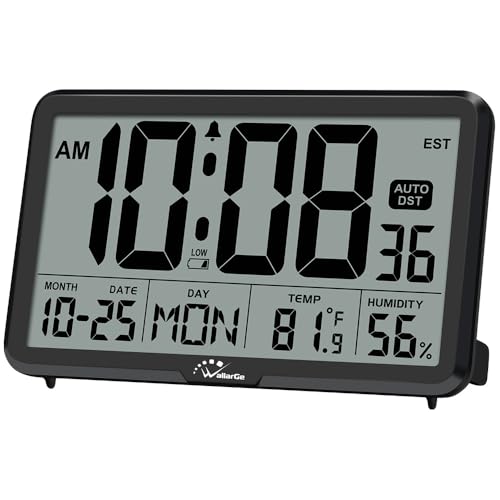
WallarGe Auto-Set Digital Desk & Wall Clock
The WallarGe Auto-Set Digital Clock offers effortless battery-powered timekeeping with pre-programmed North American time zones, an 8-minute snooze alarm, and precise indoor climate readings. Designed without a glowing backlight, it is an ideal daytime desk companion or pitch-black bedroom timepiece for sleepers who despise nighttime screen glare.
Pros
- Cordless battery operation allows flexible placement on walls, desks, or nightstands without wall outlet restrictions.
- Pre-set internal clock chip automates initial setup and seasonal Daylight Saving Time transitions across 8 North American time zones.
- Integrated Swiss SHTC3 sensors deliver accurate real-time indoor temperature and humidity readings.
- Zero backlighting prevents nighttime light pollution and ambient glow in pitch-black bedrooms.
- Integrated memory battery saves your time and calendar settings during main battery replacements.
Cons
- Lacks an active backlight or on-demand illumination, making the display unreadable in pitch-black darkness without turning on a lamp.
- Requires three AA batteries that are not included in the package.
- Internal pre-set mechanism is non-atomic, requiring manual fine-tuning if minor internal time drift occurs over years.
JALL 16-Inch Large Digital Wall Clock with Dual
The JALL 16-Inch Digital Clock delivers high-visibility timekeeping with an expansive LED screen displaying the time, date, day, and indoor temperature. Featuring flexible dual alarms with weekday-weekend schedules, an auto-dimming sensor, and Bluetooth time calibration, it is an ideal choice for seniors, classrooms, offices, and spacious bedrooms.
Pros
- Large 15.35-inch wide display with high-contrast digits makes checking the time easy for seniors and visually impaired users without glasses
- Bluetooth connectivity simplifies initial setup by syncing the exact time directly from a mobile device without tedious manual button programming
- Independent dual alarms support separate weekday and weekend schedules to match modern work and school routines
- Generous 11.5-foot power cord allows flexible mounting on high walls or placement across wide credenzas without extension cords
- Internal memory battery safeguards your time and alarm configurations during short electrical outages
Cons
- Requires constant AC wall power to operate and cannot run cordlessly on battery power alone
- Internal backup battery preserves clock memory only and will not illuminate the LED screen during a power blackout
- Bluetooth functionality is dedicated strictly to quick time synchronization and cannot be used as an audio speaker
WallarGe 14.5-Inch Digital Wall Clock
With oversized time digits and an integrated calendar and thermometer, this WallarGe display offers clear visibility across large rooms. Its battery operation and fold-out stand make it a versatile choice for walls or tabletops without needing an electrical outlet.
Pros
- Large, easy-to-read numbers visible from across a room
- Dual placement options with wall mount and fold-out stand
- Automatic Daylight Saving Time adjustment feature
- On-screen low battery warning indicator
- Included template simplifies wall hanging without measuring
Cons
- Requires four AA batteries that are not included
- Control buttons are located on the back panel
Practical Guide on How to Set Digital Wall Clock Displays
Digital wall clocks eliminate the guesswork of traditional sweeping hands by providing high-contrast numerical displays of time, calendar dates, and ambient indoor conditions. Configuring these units correctly depends largely on the underlying internal chipset and synchronization method built into the chassis. Knowing whether your clock relies on physical push buttons, automated internal quartz programming, WWVB radio broadcast signals, or Bluetooth smartphone calibration simplifies the entire setup procedure.
Identifying Your Digital Wall Clock Synchronization Type
Modern digital wall displays fall into four distinct operational categories based on how they receive and process time data. Standard manual units rely entirely on physical tactile buttons positioned across the rear or side panel to adjust hours, minutes, and calendar data. Pre-programmed autoset models, such as specific WallarGe battery-operated clocks, carry internal calendars with factory-programmed time data that activate the moment you insert batteries.
Atomic digital wall clocks feature built-in radio receivers tuned to the WWVB broadcast signal transmitted from Fort Collins, Colorado. These self-setting units synchronize their internal quartz movements overnight to maintain atomic accuracy without manual intervention. Advanced digital displays, including large 16-inch models from JALL, integrate Bluetooth sync modules that communicate directly with mobile devices for rapid time calibration. Checking the model specifications or rear housing labels will immediately reveal which synchronization technology your clock uses.
Power Delivery, Battery Installation, and Memory Retention
Proper electrical current is necessary before attempting any programming sequence on a digital display. Battery-operated wall clocks typically require three or four alkaline AA or AAA batteries to power their liquid crystal displays and internal microcontrollers. Inserting fresh cells with matching polarities prevents irregular display segment fading and erratic button response during configuration. Avoid mixing depleted batteries with new ones, as uneven voltage delivery can disrupt sensitive timing circuits.
Large-format light-emitting diode displays demand substantial electrical power that standard alkaline batteries cannot provide continuously. Models featuring vibrant multicolor digits or multi-level backlights usually require a direct 5V/2A mains wall power adapter connected via a lengthy power cord. These mains-powered clocks almost always include an internal memory battery, such as a CR2032 lithium coin cell, to safeguard time and calendar settings during electrical outages. Verifying whether your clock runs purely on batteries or requires continuous line power prevents unexpected display shutoffs.
Programming Manual Push-Button Digital Wall Clocks
Setting a traditional manual digital wall clock begins by locating the control cluster on the rear casing. Most models feature dedicated buttons labeled SET, MODE, UP, DOWN, and 12/24. Pressing and holding the SET or MODE button for approximately three seconds initiates the programming sequence, which causes the hour digits on the front screen to blink. While the digits are flashing, pressing the UP or DOWN buttons increments the numbers to the current hour.
Pay close attention to the small AM or PM indicator on the screen to prevent setting your clock twelve hours out of phase. Once the correct hour appears, pressing the SET button confirms the value and advances the flashing cursor to the minute digits. Adjust the minutes using the directional buttons and press SET once more to navigate through the year, month, and calendar date fields. Conclude the setup by pressing SET a final time or allowing the clock to sit idle for ten seconds until the display stops flashing.
Configuring Radio-Controlled WWVB Atomic Wall Clocks
Atomic wall clocks automate the timekeeping process by capturing low-frequency 60 kHz radio signals broadcast across North America. When setting up an atomic model, such as the WallarGe Self-Setting Atomic Digital Wall Clock, the first step is selecting your appropriate regional time zone, such as Pacific, Mountain, Central, or Eastern. After inserting the required AAA batteries, the clock enters search mode and displays a flashing radio tower icon. The internal receiver begins scanning for the Fort Collins transmission to pull atomic time directly from the airwaves.
Physical placement significantly influences the success of an atomic synchronization attempt. Placing the clock near exterior windows and pointing the rear housing toward Colorado generally improves initial signal capture. Keep the unit away from heavy electronic interference, such as microwave ovens, desktop computers, metal framing, and large television screens. If the clock cannot lock onto the signal immediately, it will attempt automatic synchronization again at midnight when atmospheric interference is at its lowest.
Pairing and Calibrating Bluetooth-Enabled Digital Clocks
Digital wall clocks equipped with Bluetooth functionality offer rapid, error-free setup without requiring manual button sequences on the back of the frame. Devices such as the JALL 16-inch digital wall clock use Bluetooth exclusively to extract precise time and date coordinates from your connected mobile phone. After connecting the clock to its 5V/2A power adapter, activate Bluetooth on your smartphone or tablet and launch the designated companion application. The clock pairs within seconds and synchronizes its LED display directly to network time.
This wireless pairing method eliminates the frustration of pressing tiny tactile switches while the clock hangs against the wall. Once the mobile handshake finishes, the internal memory battery maintains this synchronized time even if the power cable gets unplugged temporarily. Users should note that the Bluetooth receiver in these clocks is dedicated strictly to time calibration and timer management rather than streaming wireless audio. This setup provides an ideal solution for large communal rooms, gyms, and modern classrooms where dismounting the clock for seasonal adjustments is inconvenient.
Managing Time Zones and Daylight Saving Time (Auto DST)
Accurate calendar tracking requires designating the correct geographical time zone during initial setup. Pre-programmed and atomic clocks support North American time zones, with select WallarGe models accommodating up to eight distinct regional zones across Atlantic, Eastern, Central, Mountain, Pacific, Alaska, Hawaii, and Newfoundland territories. Cycling through the ZONE button toggles the active geographic region, aligning the internal quartz offset with your local standard time. Choosing the wrong zone causes the clock to display an accurate minute count with an incorrect hour value.
Daylight Saving Time features require careful attention to prevent bi-annual one-hour scheduling errors. Most digital wall clocks incorporate an AUTO DST toggle that advances the hour forward in spring and rolls it back in autumn automatically. If you reside in an area that does not observe seasonal time shifts, such as Arizona or Hawaii, access the system settings to turn the Auto DST switch off completely. When disabled, the DST icon vanishes from the screen, ensuring the clock remains fixed to standard time year-round.
Calibrating Auxiliary Displays: Temperature, Humidity, and Date Formatting
Advanced digital wall clocks do far more than track hours and minutes by displaying environmental data on their expansive screens. Units incorporating Swiss high-precision SHTC3 detection sensors monitor real-time indoor temperature and relative humidity to help maintain balanced indoor climates. If your clock allows temperature unit toggling, pressing the C/F button switches the readout between Celsius and Fahrenheit instantly. These sensors require approximately thirty minutes after initial power-up to stabilize and reflect accurate ambient room readings.
Multi-segment LCD screens also provide dedicated fields for the month, date, and day of the week. Certain models, like the WallarGe 14.5-inch large digital display, allow users to toggle between different secondary display modes, such as showing the day only, the temperature only, or alternating between both every ten seconds. Unlike smaller multi-function bedside clocks that crowd auxiliary data onto compact bedside panels, wall-sized displays provide clear physical separation between time digits and calendar sections. Ensure that the calendar year is set accurately so the internal calendar accurately correlates days of the week with calendar dates.
Display Brightness, Auto-Dimming Sensors, and RGB Lighting Modes
Visual comfort depends heavily on how well a wall clock regulates its luminous output across changing room lighting conditions. High-definition LCD screens rely on passive reflective ambient light, making them glare-free in bright daylight but potentially hard to read in complete darkness without supplemental room lighting. In contrast, illuminated LED wall clocks provide bright active illumination with manual dimming controls ranging across several discrete brightness tiers. Selecting a moderate brightness level ensures clear visibility across the room without washing out surrounding decor.
Advanced wall clocks often feature integrated photodiode ambient light sensors that automatically decrease screen brightness as the room darkens. This dynamic dimming prevents nighttime glare in bedrooms while preserving maximum contrast during bright afternoon hours. Multi-color LED clocks also offer vibrant RGB display modes, allowing users to select solid amber, clean white, or shifting color palettes to suit room decor. When mounting an auto-dimming clock, verify that the front-facing light sensor remains unobstructed by hanging wires, frames, or wall trim.
Wall Mounting Alignment, Desktop Stand Deployment, and Viewing Angles
Physical installation represents the final mechanical step in deploying your digital timekeeper. Many large battery-operated clocks include a pre-measured mounting template ruler that indicates the exact spacing required between wall screws. Using this template prevents wall damage and ensures that the clock hangs perfectly level against drywall, plaster, or wooden paneling. Secure wall anchors should be used when installing larger displays to prevent accidental falls caused by door vibrations.
Flexible mounting hardware often includes sturdy fold-out desktop kickstands built directly into the rear enclosure. Deploying these kickstands allows you to place the clock on living room credenzas, kitchen islands, or office desks without drilling holes. Liquid crystal panels exhibit specific vertical and horizontal viewing angles, meaning contrast can degrade if the clock is mounted too high above eye level. Angling the display toward primary seating areas guarantees high-contrast legibility from anywhere in the room.
Troubleshooting Common Digital Wall Clock Setup Glitches
Setup complications occasionally occur when configuring digital wall clocks for the first time. If an atomic clock repeatedly fails to synchronize with the WWVB broadcast, manually force a signal search by pressing the designated wave button or rotate the clock ninety degrees to improve directional antenna reception. Remember that atmospheric conditions during daylight hours often degrade low-frequency radio propagation, making overnight synchronization far more dependable. If synchronization continues to fail, entering manual setup mode allows you to calibrate the time directly until seasonal radio conditions improve.
Display flickering, missing digit segments, or unexpected midnight resets usually indicate sagging battery voltage rather than internal hardware defects. Replacing all cells simultaneously with fresh brand-name alkaline batteries typically restores crisp segment contrast and stable operation. For plug-in LED models that lose their time settings following a power interruption, inspect and replace the internal memory coin battery inside its dedicated compartment. If you are comparing wall displays with bedroom lighting solutions, learning how gradual sunrise simulation clocks manage internal time retention can illustrate how modern sleep electronics handle electrical interruptions.
Taking a few minutes to configure your digital wall clock properly ensures dependable timekeeping and clear daily organization throughout your home or workspace. Always complete the time, date, and zone configuration while holding the clock comfortably in your hands before securing it onto high wall mounts. With fresh batteries installed and automated daylight adjustments verified, your digital wall display will deliver seamless, accurate timekeeping for months to come.
About the author
McKenzie Dillon is a Certified Sleep Science Coach and experienced sleep-product editor who has personally tested dozens of sleep products. Her expertise bridges sleep technology, product evaluation, and practical guidance for creating more comfortable sleep and wake-up routines.