
How to Set the Time on a Sharp Alarm Clock: Practical Guide for 2026
Learn how to set the time on a sharp alarm clock quickly to ensure reliable morning wakeups and blackout dimming in October 2026.
 By Daniel Noyed
Updated October 13, 2026
By Daniel Noyed
Updated October 13, 2026

Waking up on schedule starts with a dependable nightstand display that keeps accurate hours without unnecessary software complications or overnight wireless glitches. When power cuts strike or daylight saving time shifts your morning schedule, understanding how to set the time on a sharp alarm clock ensures your bedside schedule stays completely aligned. Modern bedroom setups often benefit from straightforward digital hardware that strips away confusing smartphone menus in favor of tactile buttons and immediate legibility. Exploring top-rated alarm clocks for bedrooms shows how dedicated bedside devices protect your sleep routine by removing the endless notifications and screen distractions that disrupt evening rest.
Whether your nightstand features front-facing keyboard controls, a multi-stage loud buzzer, or an automatic self-setting system, configuring the core digits takes only a few deliberate button presses. Taking the time to master your clock’s interface prevents midnight confusion, accidental 12-hour AM and PM inversions, and missed wake-up alerts when you need them most. From basic timekeeping switches to independent dual-schedule toggles, learning the mechanical layout turns any bedside unit into a seamless morning companion. A properly configured clock provides immediate peace of mind so you can fall asleep knowing your morning wake-up call is completely secure.
| Award | Product | ACR Score About ACR ScoreThe ACR Score is our own rating from 0 to 10, based on performance, design and build, ease of use, and value. It reflects independent research and is never influenced by manufacturers, retailers, or affiliate commissions. Learn more › | |
|---|---|---|---|
| Best Overall |
Sharp Shockwave 105dB Super Loud Dual Alarm Clock
|
9.1/10 | Buy |
| Best Budget |
 Sharp Digital Bedside Alarm Clock with Simple
|
8.4/10 | Buy |
| Best Value |
 Sharp Digital Alarm Clock with 1.8-Inch Red LED
|
8.4/10 | Buy |
| Best Premium |
 DreamSky Auto Set Digital Bedside Alarm Clock
|
8.3/10 | Buy |
 Sharp Digital Bedside Alarm Clock with Swivel
|
8.1/10 | Buy | |
 Sharp AccuSet Self-Setting Bedside Digital Alarm
|
8.1/10 | Buy |
Sharp Shockwave 105dB Super Loud Dual Alarm Clock
The Sharp Shockwave delivers up to 105dB of wake-up audio across four distinct tones, making it an effective bedside solution for heavy sleepers and hard-of-hearing individuals. Featuring dual alarms, a four-step dimmable red LED display, and battery backup timekeeping, it provides straightforward reliability without taking up excess nightstand space.
Pros
- High maximum volume reaching up to 105dB designed for heavy sleepers and hard-of-hearing users
- Four distinct alert sounds provide variety beyond standard electronic beeps
- Red LED display with four brightness levels helps reduce ambient bedroom glow
- Dual independent alarms support multiple wake-up schedules
- Battery backup maintains internal time and alarm settings during household power interruptions
Cons
- Display remains unlit during power outages when running on backup AA batteries
- Requires two AA batteries for outage protection that must be purchased separately
- Does not include integrated USB charging ports for bedside mobile devices
Sharp Digital Bedside Alarm Clock with Simple
The Sharp Digital Alarm Clock combines simple keyboard-style controls with a high-visibility red LED readout and an easy-to-hit snooze bar. With its compact footprint and reliable AAA battery backup that keeps the alarm active during power outages, it is an ideal straightforward bedside clock for minimalists, seniors, and students.
Pros
- Intuitive keyboard-style top buttons make programming time and alarms straightforward for all ages
- Loud audible alarm helps wake deep sleepers and everyday commuters reliably
- Dedicated battery backup keeps the alarm functional even during overnight electrical blackouts
- Oversized top snooze button is easy to press without fumbling around in the dark
- Space-saving 4.35-inch wide chassis preserves valuable space on compact bedside tables
Cons
- Lacks adjustable brightness dimming controls, which may feel too bright for very light-sensitive sleepers
- Requires 2 AAA backup batteries that are not included in the package
- Display remains dark during a power outage until mains AC electricity is restored
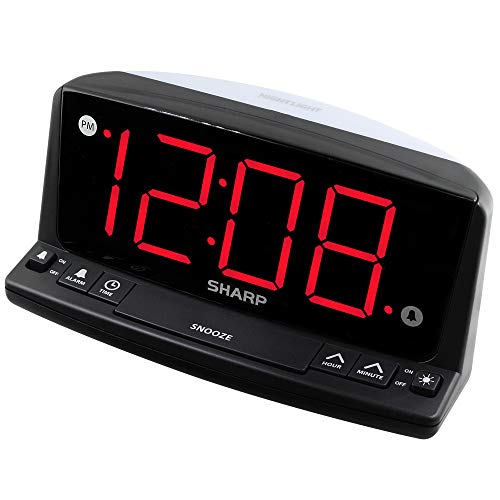
Sharp Digital Alarm Clock with 1.8-Inch Red LED
The Sharp Digital Bedside Alarm Clock pairs a jumbo 1.8-inch red LED readout with intuitive front-facing keyboard controls and a built-in night light. With a loud beep alarm and a 9V battery backup that still sounds during power outages, it is an accessible, reliable option for seniors, heavy sleepers, and straightforward nightstand timekeeping.
Pros
- Large 1.8-inch red LED numerals are easily readable from across the room
- All buttons are mounted directly on the front panel for senior-friendly, intuitive operation
- 9V battery backup ensures the alarm still sounds even if an overnight storm knocks out household power
- Integrated night light feature provides added functionality for nurseries, bedrooms, or guest rooms
- Generous 9-minute snooze gives groggy sleepers a simple, repeatable morning buffer
Cons
- Lacks documented multi-level brightness dimming, which may feel bright to light-sensitive sleepers in pitch-black bedrooms
- Display screen blanks out during power outages to conserve backup battery energy
- Requires a standard 9V battery for backup operation that is not included in the box
DreamSky Auto Set Digital Bedside Alarm Clock
The DreamSky Auto Set Digital Alarm Clock is a compact bedside timepiece featuring a 4.3-inch LCD with blue digits, indoor temperature, calendar readouts, and stepless 0-100% dimming. It is an ideal pick for anyone seeking hassle-free automatic time setup, ascending beeps, and nightstand USB device charging without clutter.
Pros
- Pre-programmed auto-time feature configures proper time immediately upon plugging in across four major U.S. time zones.
- Full-range 0% to 100% dimmer dial enables fine-tuned brightness adjustment to accommodate light-sensitive bedrooms.
- Secondary pass-through USB port lets you charge a mobile phone without taking up an extra wall outlet.
- Gentle ascending beeper ramps up gradually instead of blasting high volume instantly.
- Included cell button battery saves your time and alarm settings during unexpected power outages.
Cons
- Button cell backup maintains memory only and will not illuminate the screen or sound the alarm during a power outage.
- Blue digit wavelength on an LCD screen may not suit sleepers who prefer warm amber or red display tones.
- Lacks dual-alarm programming or weekday-versus-weekend custom scheduling options.
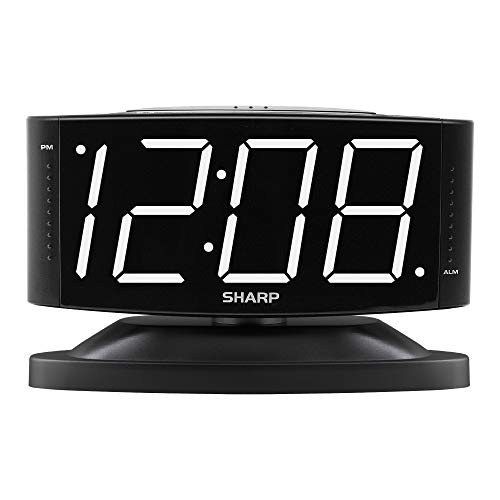
Sharp Digital Bedside Alarm Clock with Swivel
The Sharp Digital Alarm Clock with Swivel Base provides dependable bedside timekeeping with high-contrast white LED digits, adjustable volume, and an intuitive layout. Built with a 9V battery backup that still sounds the alarm during a power outage, it is an ideal choice for anyone seeking simple, phone-free mornings.
Pros
- Integrated 9V battery backup keeps the wake-up alarm functional during AC power cuts while preserving time settings.
- Swivel base allows physical display tilt for improved viewing angles from bed.
- Dual alarm volume switch gives users a choice between loud and moderate wake-up levels.
- Uncomplicated button controls make programming accessible for kids, teens, and seniors.
Cons
- Dimmer is limited to high and low toggle positions rather than a stepless dial.
- Display screen turns blank during power outages to conserve 9V battery power.
- Requires standard 120V US wall outlets and is not compatible with 240V international power.
Sharp AccuSet Self-Setting Bedside Digital Alarm
The Sharp AccuSet Self-Setting Alarm Clock offers plug-and-play bedside reliability with an automatic time chip, large green LED readout, and pre-installed battery backup. It is an ideal, hassle-free timekeeper for seniors, students, guest rooms, and anyone seeking a simple phone-free nightstand clock.
Pros
- AccuSet technology automatically sets the accurate time immediately upon plugging in
- Pre-installed backup battery protects time and alarm settings during unexpected power interruptions
- High-contrast, large green LED display is easy to read across the bedroom without eyeglasses
- Simplified Daylight Saving Time adjustment eliminates manual clock-cycling twice a year
- Compact footprint under 6 inches wide fits neatly on crowded nightstands and dorm desks
Cons
- Backup battery preserves internal memory settings only and does not illuminate the display or sound the alarm during outages
- Lacks advanced convenience features such as USB device charging ports, dual alarm schedules, or radio playback
- Green LED display specifications do not indicate stepless dimming or a full display blackout option for light-sensitive sleepers
Mastering Time Settings, Button Controls, and Daily Operation on Sharp Bedside Clocks
Setting the correct time on a bedside digital clock forms the foundation of a predictable morning routine. While older analog dials required mechanical turning, digital models from Sharp employ dedicated front buttons, rear sliding switches, or automated quartz systems. Identifying which control interface your specific model uses determines the exact sequence needed to set the hour and minute accurately. With a clear understanding of the control layout, you can program your unit in under a minute and avoid the frustration of missed appointments.
Decoding the Interface: Front Keyboard Controls versus Rear-Panel Switches
Sharp bedside units generally fall into two distinct physical design philosophies regarding control placement. Traditional designs locate programming toggles on the back or bottom casing to maintain a sleek aesthetic, while modern iterations feature front-facing keyboard controls positioned directly beneath the display. Models like the Sharp Digital Alarm Clock, 1.8″ Red LED and the Sharp Digital Alarm Clock with Keyboard Controls place all setup buttons in plain view on the front bezel. This forward-facing architecture eliminates the awkward fumbling often required when trying to locate tiny switches behind a nightstand in dim lighting.
Conversely, clocks that feature specialized bodies, such as the Sharp Digital Alarm Clock with Swivel Base, frequently position secondary switches on the rear or underside. On these models, physical slide switches dictate operational states such as Time Set, Alarm Set, and Run or Lock modes. Familiarizing yourself with the control layout before plugging the device into wall power prevents pressing the wrong switch in the dark. Once you recognize whether your clock uses tactile push-buttons or multi-position slide switches, adjusting the displayed time becomes entirely straightforward.
Step-by-Step Manual Time Setup for Standard Slide-Switch Models
Standard digital clocks with multi-position slide switches require shifting the main toggle into an active programming mode. Start by locating the function switch on the rear or top panel and sliding it from the Run or Normal position into the Time Set position. Once shifted, the digital readout will often flash or unlock the internal time register for adjustment. You will then use the adjacent Hour and Minute push buttons to advance the numbers to the current local time. Releasing the buttons locks in the selected digits before you finalize the configuration.
Advancing the hour requires careful attention to the small visual AM and PM indicators on the display face. Most Sharp clocks utilize a dedicated red or green dot on the left side of the display to designate PM hours, while the absence of a dot typically signals AM. Holding down the Hour button cycles rapidly through the twelve-hour sequence, allowing you to move quickly across the day. After setting both the hour and minute to the exact minute, slide the main function switch back to the Run or Normal position. Returning the switch to Run ensures the internal quartz mechanism advances time normally while preventing accidental adjustments.
Setting the Hour and Minute on Front-Facing Keyboard Models
Clocks engineered with keyboard-style controls streamline manual adjustments by dedicating individual push-buttons to core functions. On these models, you will usually find labeled buttons marked Time, Hour, and Minute placed conveniently along the lower front panel. To initiate time adjustment, press and hold the Time button with one finger while simultaneously tapping the Hour button to advance the hour digits. Continue holding the Time button as you switch to pressing the Minute button until the exact minute appears on the screen.
Releasing all front buttons immediately saves the updated time into the active memory circuit. Because each button provides clear tactile feedback, setting the clock does not require navigating complex multi-tiered digital menus. This physical layout proves especially beneficial for seniors, children, or anyone who prefers direct mechanical interaction over digital touchscreens. If your unit also includes auxiliary nightstand features, such as the night light switch found on select front-control models, you can test that function independently without disturbing the programmed time.
How Sharp AccuSet Self-Setting Clocks Handle Automatic Time and DST
Certain advanced models bypass manual time entry entirely by utilizing integrated internal timekeeping chips. The Sharp AccuSet Self-Setting Alarm Clock with Auto comes pre-programmed at the factory with the correct date and time stored in non-volatile memory. When you connect the clock to an AC wall outlet, the internal microprocessor instantly reads the stored calendar data and illuminates the exact local hour and minute on the green LED screen. This plug-and-play capability removes programming friction, making it an ideal choice for guest bedrooms, dorm rooms, and elderly users.
Managing seasonal shifts on self-setting models is similarly effortless thanks to automated Daylight Saving Time circuits. A dedicated switch on the rear casing allows you to enable or disable automatic DST adjustments based on whether your region observes the seasonal time shift. Alternative auto-setting designs, such as the DreamSky Alarm Clocks for Bedrooms, provide selectable time zone switches covering Eastern, Central, Mountain, and Pacific zones to guarantee geographic accuracy. If you ever need to manually override an AccuSet clock, holding down the dedicated Time Set button allows standard minute-by-minute calibration just like a conventional unit.
Configuring Wake-Up Schedules and Testing Loud Acoustic Alarms
Programming the alarm function follows a sequence that closely mirrors time configuration but relies on separate controls. To set your wake-up time, hold the Alarm Set button or slide the master switch to the Alarm position, then tap the Hour and Minute buttons to choose your wake target. Always verify the PM dot indicator during this step to avoid accidentally scheduling a wake-up alert for noon instead of midnight or dawn. Once set, slide the alarm toggle switch to the On position to arm the internal acoustic chime or buzzer.
Different models offer distinct auditory options to accommodate various waking preferences and sleep depths. The Sharp Shockwave 105dB Super Loud Alarm Clock, for example, allows users to choose between four distinct audio profiles, including an air horn, school bell, train whistle, or standard beep. It also features three adjustable volume settings ranging from 85 decibels up to an extreme 105 decibels for heavy sleepers and hard-of-hearing individuals. If you are comparing specialized acoustic alerts with gentle dawn-simulation options, reviewing sunrise alarm clocks for heavy sleepers reveals how combining optical stimulation with acoustic alarms can ease morning grogginess.
Display Spectrum, Dimmer Control, and Melatonin-Friendly Nightstand Setup
Bedside lighting plays a critical role in nocturnal sleep quality and natural melatonin production. Sharp digital clocks frequently incorporate red LED displays, which emit narrow-band light that minimizes circadian disruption compared to bright blue or cool-white backlights. Units like the Sharp Digital Alarm Clock, 1.8″ Red LED offer jumbo 1.8-inch digits that remain easily readable from across the room without requiring reading glasses. For individuals who prefer an alternative optical profile, green LED models provide high-contrast clarity that remains distinct in low-light environments.
Managing brightness levels is essential to prevent bedside glare from illuminating a dark bedroom at night. Models equipped with physical dimmer toggles, such as the High and Low switches found on swivel-base and jumbo-digit models, let you dial back brightness before turning off the bedside lamp. Other bedside electronics, including modern alarm clock and wireless charger options, often integrate full-range rotary dials to achieve zero-glare sleep conditions while powering mobile accessories. Positioning your clock so that its display angle avoids direct reflection into your eyes ensures optimal rest throughout the night.
Power Delivery Architecture: AC Mains Operation versus Battery Backup Behavior
Understanding the power architecture of your bedside clock prevents unexpected alarm failures during electrical outages. The vast majority of standard Sharp bedside clocks are engineered to operate primarily on 110-volt or 120-volt AC household current via a dedicated wall cord. While these units feature a battery compartment on the bottom casing, this compartment serves strictly as a backup system. Depending on the specific model, the backup system requires either two AA batteries, two AAA batteries, or a single 9-volt transistor battery to maintain functionality.
A vital operational detail to understand is how the display behaves when household electrical power is lost. During an AC power disconnection, models like the Sharp Shockwave turn off the LED display completely to conserve battery voltage, yet the internal quartz circuit continues tracking time silently. On models utilizing 9-volt backup cells, the screen goes dark to save power, but the internal time settings are retained and the audible alarm will still sound at the scheduled wake-up hour. Always inspect the battery compartment periodically to replace depleted cells and prevent corrosion from compromising the electrical terminals.
Troubleshooting Time Drift, Power Reset Glitches, and Common Setup Errors
If your digital alarm clock suddenly resets to 12:00 or begins flashing erratically, a momentary voltage drop in your residential power line is often the root cause. When AC power flickers without an active backup battery installed, the internal volatile memory dumps its stored values and reverts to factory initialization. Installing fresh alkaline batteries in the backup compartment immediately resolves this issue by bridging electrical brownouts seamlessly. In addition, ensure the AC power cord sits securely in the wall receptacle without tension that could dislodge the plug.
Time drift can occasionally occur over several months due to tiny temperature variations affecting the internal quartz crystal resonator. If you notice your clock gaining or losing a minute over time, perform a quick manual realignment by holding the Time button and tapping the Minute switch to synchronize with an official time standard. Another frequent user error involves confusing the temporary snooze button with the permanent alarm disarm switch. Most Sharp models feature a large top-mounted bar that provides a 9-minute snooze delay, but fully canceling the alarm requires sliding the dedicated side or rear alarm switch to the Off position.
Nightstand Placement, Cord Safety, and Wake-Up Verification
Proper physical placement of your bedside clock enhances both operational convenience and morning awakening success. Position the clock on a stable nightstand surface away from edge hazards, ensuring the AC power cord hangs freely without kinks or heavy furniture resting on the wire. Routing cables neatly prevents accidental disconnections and reduces nightstand clutter, especially if you also use bedside lamps or charging pads. For adjustable units like the swivel-base model, pivot the display face toward your pillow to maintain clear sightlines while resting in bed.
Conducting a silent or active alarm test after setting the time provides total assurance before you turn in for the night. Set the alarm time two minutes ahead of the current displayed time, arm the switch, and observe whether the alarm sounds and whether the snooze bar pauses the chime properly. Verifying this sequence confirms that your AM or PM designation is correct and that the speaker transducer is functioning at your preferred decibel setting. Taking two minutes to establish and verify your clock settings guarantees a punctual, stress-free morning routine every single day.
About the author
Daniel Noyed is a Certified Sleep Science Coach and experienced product editor with extensive knowledge of sleep health and sleep-related products. He has hands-on experience testing hundreds of products and translating technical features into practical guidance for everyday sleepers.